

Recover Donation Data in an Afternoon: Conversions API for Nonprofits


Nonprofits running Meta ads should implement the Conversions API to recover donation events lost to browser tracking blocks and iOS privacy restrictions. The immediate payoff is better event matching and the ability to pass actual donation values to Meta, which lets the ad delivery system optimize toward high-value donors instead of just clicks.
TL;DR:
Most nonprofits should start with a native platform integration for ease, but may need to shift to server-side setups for advanced customization or specific data needs.
Passing actual donation values and donor identifiers improves ad optimization and aligns Meta’s reported conversions with real donation data, reducing reconciliation gaps.
Proper deduplication relies on consistent use of event identifiers and hashed user data across browser and server events to prevent inflated donation counts.
Before going live, ensure consent gating blocks events until permission is granted, and verify that event IDs, values, and user data are correctly implemented and consistent.
A simple, reliable setup focused on value and consent management typically suffices for small teams, with full server integrations reserved for organizations with dedicated engineering resources.
Table of Contents
What Is Conversions API for Nonprofits, and How Does It Differ From the Pixel?
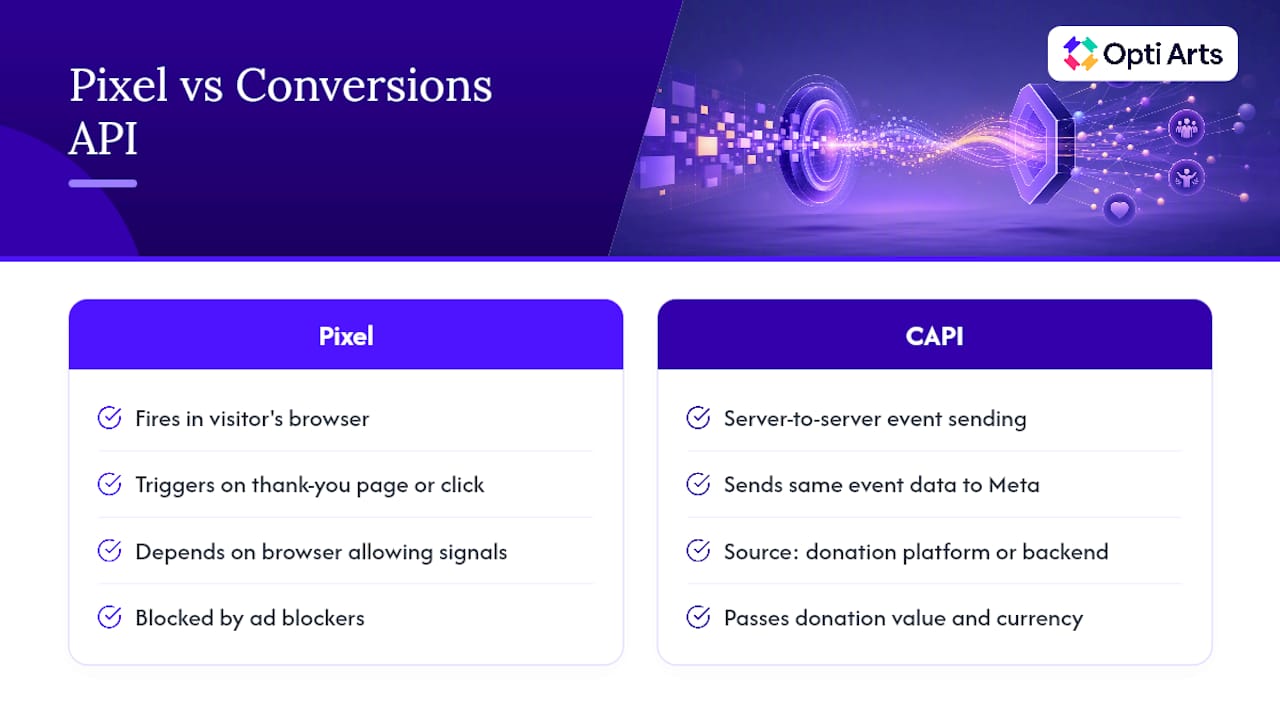
The Meta Pixel tracks donations from inside a visitor’s browser. It fires a snippet of code when someone lands on a thank-you page or clicks a donate button, and it reports that action back to Meta. The problem is that browsers increasingly get in the way. Ad blockers, Safari’s Intelligent Tracking Prevention, and third-party cookie restrictions all interfere with pixel signals before they ever leave the donor’s device.
The Conversions API works differently. It sends the same event data server to server, straight from your donation platform or backend to Meta, without depending on what a browser allows through. For nonprofits, that typically means passing events like Donate and InitiateCheckout, along with parameters such as donation value and currency.
Most nonprofit donation flows route through a third-party processor. That means CAPI often needs to hook into whatever system confirms the transaction, not just the front-end donation page, which is why the setup route you choose depends heavily on your existing platform.
Why Better Conversion Data Improves Fundraising Campaigns
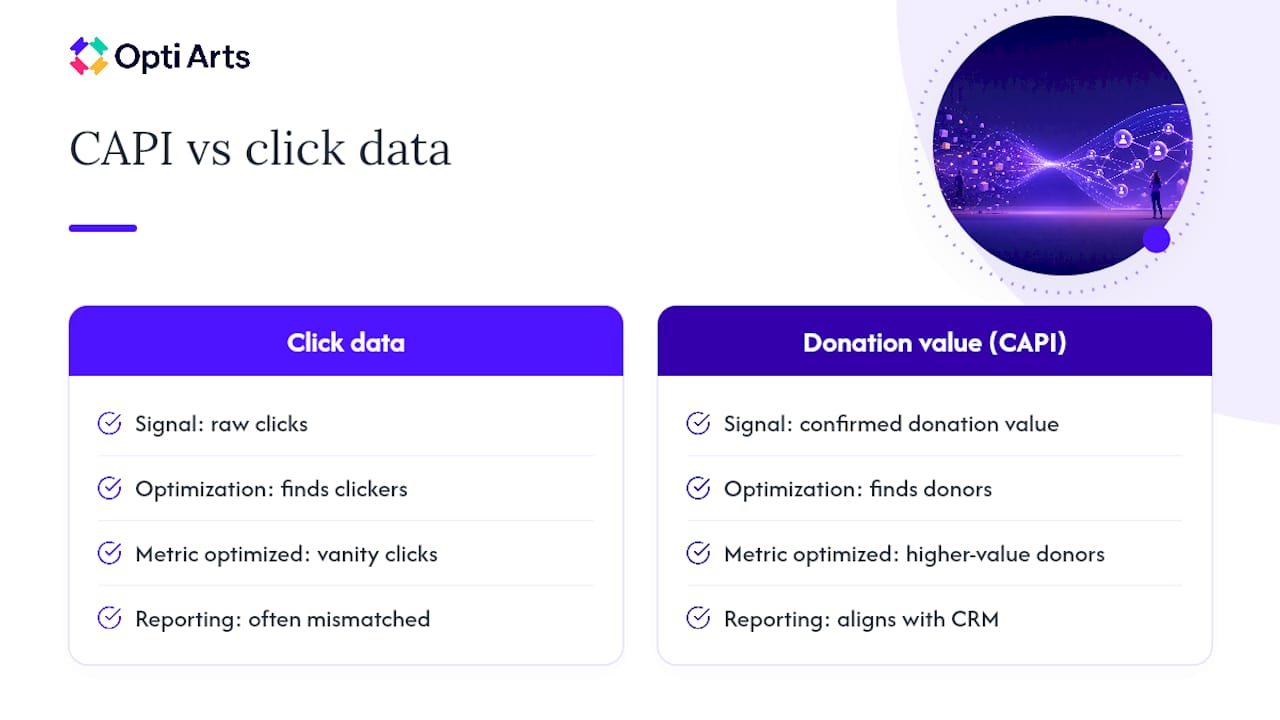
Meta’s bidding system optimizes toward whatever signal you give it. Feed it raw click data and it will find you clickers. Feed it donation value, and it starts finding people who actually give, and give generously.
That is the core argument for CAPI: it supplies “hard” conversion data, meaning confirmed donation amounts tied to real campaign context, which Meta’s ad algorithms use to optimize toward higher-value donors rather than optimizing toward vanity metrics like link clicks. Skip the value parameter and you are leaving Meta’s machine learning half blind.
There is a reporting benefit too. When CAPI events are configured correctly, the conversions your ad account reports start lining up with what your donation database actually shows. Without it, you are often left guessing why Meta claims 40 donations for a campaign that your CRM only shows 28 for.
The Realistic Setup Routes You’ll Meet and Their Trade-offs
Every nonprofit implementing CAPI lands on one of three paths. Which one fits depends on your dev resources, not your budget alone.
Platform-native integration. If you use a donation platform like Fundraise Up, CAPI setup is largely a configuration toggle. Fundraise Up’s integration sends InitiateCheckout and Donate events with hashed donor data automatically, using event_id for deduplication and only firing events when marketing consent allows it. This is the lowest-effort route and the right starting point for small teams, but you still need to confirm the platform is actually respecting your consent banner settings.
Google Tag Manager server-side container. This is the middle path. You stand up a server-side GTM container, forward events from your website’s dataLayer to it, and let the server container talk to Meta. It gives you more control over event shaping than a native integration, but it needs a developer to configure the server container correctly and keep event_id consistent across browser and server events.
Direct server integration. Your backend sends events straight to Meta’s API. This is the most flexible option and the one large institutions eventually need, since it lets you attach any parameter your donation system captures. It is also the most dev-heavy, and it is overkill for a team without an engineer on staff.
Most organizations that run both the Pixel and CAPI need deduplication to avoid double-counting the same donation. Meta matches events using shared identifiers, primarily event_id, along with browser cookies fbc and fbp. Get those identifiers inconsistent between your browser and server events, and Meta will report inflated conversion numbers that don’t match reality.
Technical Checklist Before You Flip the Switch
Before any CAPI implementation goes live, run through these items in order:
Consent gating is wired up. Your Consent Management Platform or Google Consent Mode setup should block marketing events, including CAPI events, until a visitor grants consent. This is not optional, and it is also where platform-native tools most often fail silently.
User identifiers are hashed correctly. Meta expects email, name, and other personal fields to be hashed with SHA256 before they leave your server. Include fbc and fbp cookie values whenever they are available; they meaningfully improve match rates.
event_id is consistent and event names match. The same donation should carry the same event_id whether it fires from the browser Pixel or your server. Mismatched names or missing IDs break deduplication.
Value and currency are present on every donation event. A Donate event without a value is nearly as useless to Meta’s bidding system as no event at all.
Access tokens are stored securely and rate limits are monitored. Treat your CAPI access token like a password, and keep an eye on Meta’s rate limits if you’re sending high volumes of test traffic.
Pro Tip: Run one donation through your test environment with consent explicitly denied. If the event still reaches Meta, your consent gate isn’t actually gating anything, and you have a compliance problem, not just a data problem.
A Prioritized Roadmap for Small Teams and Dev-Backed Teams
Skip the temptation to build the most sophisticated implementation on day one. Build the simplest thing that produces reliable data, then improve it.
Path 1: No-dev, platform-native. If your donation platform offers a native Meta integration, turn it on first. Confirm your consent signals are actually being forwarded, not just theoretically configured, and validate that Donate events are landing in Meta Events Manager with a value attached. This path needs a marketer, not an engineer, and it should take an afternoon.
Path 2: GTM and server-side hybrid. Once the native integration is working, or if your platform doesn’t offer one, move to a server-side GTM container. This requires:
Standing up the server container and pointing your web container’s tags at it.
Forwarding key dataLayer events (donation started, donation confirmed) to the server.
Propagating event_id from the browser event to the matching server event so deduplication works.
This path needs a developer for setup, though a marketer can usually manage tag configuration afterward.
Path 3: Full server integration. Reserve this for organizations with a dedicated donation backend and engineering support. Your backend needs to send confirmed donation events with value, currency, event_id, and hashed user_data directly to Meta’s endpoint, independent of any tag manager.
Escalate from Path 1 to Path 2 only when your platform-native setup can’t capture a parameter you need, like a specific fundraising campaign ID. Escalate to Path 3 only when you have a backend engineer who can own it long term, since server integrations that lose their maintainer tend to silently break within a year.
Testing and Troubleshooting Your Conversions API Setup
Validate before you trust the data. Meta’s own testing guidance recommends a specific sequence:
Make a test donation with marketing consent explicitly granted, in a dev or staging environment.
Capture the event_id, along with fbc and fbp values, from the page itself.
Confirm the event arrives in Meta Events Manager’s test events tool with the correct value and currency.
Repeat the same flow with consent denied, and confirm the event is blocked. If it still shows up, your consent integration is broken.
Once live, reconciliation is where most divergence between your ad reports and your actual donation records gets exposed. Fundraise Up’s integration documentation points to three recurring culprits: browser events blocked by ad blockers, third-party payment redirect flows that break attribution mid-transaction, and inconsistent deduplication when event_id is missing or mismatched between systems. A monthly sampling exercise, comparing a set of ad-reported conversions against your donation platform’s own records, usually surfaces which of the three is causing your gap.
If events are missing entirely, check consent forwarding first. If events are duplicated, check event_id consistency second. Those two checks resolve the overwhelming majority of CAPI reconciliation problems nonprofits run into.
Opti Arts’ Take on Implementing CAPI for Cultural and Nonprofit Clients
We consistently recommend platform-native integrations first, GTM hybrids second, and custom server builds only when a client’s donation stack genuinely demands it. Our own measurement priority is always donation value reconciliation tied to campaign-level attribution, because a clean event count with no value data tells you almost nothing about which campaigns actually raised money.
— Trevor
Get Your Conversions API Set Up Right the First Time
We offer services to help verify whether your CAPI setup is actually feeding Meta clean donation data. We handle CAPI configuration, event validation, and campaign analytics for cultural organizations and nonprofits that would rather have a specialist confirm every event_id and consent gate than discover a reconciliation gap three months into a campaign.

Our team sets up the integration, tests it against Meta Events Manager the way this article outlines, and then hands you an ongoing view of performance through Breakeven, our dashboard that ties ad spend directly to donation outcomes. If your organization runs paid campaigns on Meta and wants donation value data that actually holds up under scrutiny, reach out through our solutions page to set up a discovery call and see what a managed implementation looks like for your specific donation platform.
Where to Go Next for Setup Details
Bookmark Meta’s CAPI documentation, Fundraise Up’s integration docs, and the WordPress Facebook Pixel plugin page for setup specifics.
Sources
FAQ
Is Conversions API Worth It for a Small Nonprofit?
Yes, particularly if you already use a donation platform with a native Meta integration. The setup effort for Path 1 is minimal, and recovering donation events lost to browser blocking directly improves how Meta’s bidding system spends your ad budget.
Is the Conversions API Free to Use?
Yes. Meta does not charge for CAPI access itself; your cost is the development or platform-configuration time needed to implement it correctly, not a licensing fee.
What Is a Conversions API and How Does It Work?
CAPI is a server-to-server method that sends conversion events, like a completed donation, directly from your server or donation platform to Meta, bypassing the browser tracking limitations that affect the standard Pixel.
How Do I Set Up a Conversions API Integration?
Start with a platform-native option if your donation platform offers one, such as Fundraise Up’s Meta integration. If you need more control, move to a GTM server-side container, and reserve a full custom server integration for organizations with dedicated engineering support.
Do I Still Need the Meta Pixel If I Set Up CAPI?
Yes. Most nonprofits run Pixel and CAPI together, using event_id to deduplicate events so the same donation isn’t counted twice across both sources.
Recommended