

Eventbrite Ads Tracking: Fix _eboga and Enable Conversions API


Eventbrite supports three major tracking pixels: Meta pixel (with Conversions API), a Google Ads conversion tag, and a Google Analytics 4 (GA4) measurement ID, plus its own built-in Eventbrite Ads reporting. Your fastest next step is to open Manage > Event Dashboard > Marketing > Tracking pixels, paste the correct ID, and verify it fires. Just know that privacy settings and embedded checkout flows can quietly block pixels, so verification isn’t optional.
TL;DR:
Verifying pixel firing is essential, as privacy settings, embedded checkouts, or misconfigurations can prevent tracking tags from registering properly.
Setting up Google Ads conversion tracking requires creating a conversion action on Google’s side before pasting IDs and labels into Eventbrite.
Eventbrite’s campaign metrics like impressions and clicks do not directly indicate ROI; focus on ticket sales and gross revenue for meaningful insights.
Proper cross-domain tracking with the _eboga parameter relies on testing and careful implementation, especially if buyers move across multiple subdomains.
Improving data accuracy involves fixing cross-domain client IDs and enabling server-side tracking, which significantly enhances visibility into campaign effectiveness.
Table of Contents
Add Tracking Pixels in Eventbrite: Meta, GA4, and Google Ads
Every pixel installation on Eventbrite starts in the same place, but the account structure changes what you’re editing. Go to your Eventbrite dashboard and look for Tracking pixels under Marketing. There, you’ll see a toggle between applying a pixel to a single event or to every event under your organizer profile. If you run a season of shows or a recurring exhibit calendar, setting pixels at the account level saves you from repeating this for every listing.
Here’s what to paste where:
Meta pixel: Enter your pixel ID. Eventbrite auto-injects the pixel code, so no manual script editing is needed, and it tracks standard events like PageView and Purchase.
GA4: Paste your measurement ID (the string starting with “G”). Eventbrite records event_listing, event_register, and purchase events automatically once it’s live.
Google Ads: Paste both the conversion ID and conversion label, generated after you build a conversion action in your Google Ads account.
If you want Meta’s server-side option, there’s a separate field for a Conversions API access token. Once you’ve saved any pixel, load your event page in an incognito window and confirm it’s firing before you launch spend against it.
How Do You Set Up Google Ads Conversion Tracking for Eventbrite?
Eventbrite doesn’t generate a Google Ads conversion for you. You build it on Google’s side first, then hand Eventbrite the resulting credentials.
Create a conversion action inside your Google Ads account, choosing “Website” as the source.
Copy the conversion ID and conversion label Google Ads generates for that action.
Paste both values into Eventbrite’s Tracking pixels field for the event or account, exactly as described in Eventbrite’s Help Center.
Understand that attribution and reporting live entirely in Google Ads from that point forward. Eventbrite passes the signal but doesn’t interpret it.
If a conversion isn’t showing up, Eventbrite support can confirm the pixel fired, but they won’t troubleshoot your Google Ads account configuration. That’s a job for Google Ads Help or Google Tag Assistant.
Treat this as a handoff, not a fully managed integration.
What Do Eventbrite Ads Campaign Metrics Actually Tell You?
Open Marketing Tools > Eventbrite Ads, select your event, and you’ll land on a campaign summary showing impressions, clicks, tickets sold, gross sales, ad spend, budget, and duration, all defined in Eventbrite’s own performance documentation.
Impressions and clicks tell you whether your creative is earning attention, nothing more.
Tickets sold and gross sales are the numbers that matter for ROI conversations with your board or director.
Ad spend versus budget shows pacing, useful for catching an underspending campaign before curtain-up.
Two limitations deserve attention. Recurring events can blur performance across multiple dates, and gross sales figures don’t always adjust for refunds or transfers after the fact. For a fuller picture, pair these numbers with GA4 or a centralized dashboard rather than treating the Eventbrite summary as the final word.
How Does Eventbrite’s _eboga Parameter Preserve Cross-Domain Tracking?
When a ticket buyer clicks from your website to an Eventbrite checkout page, Google Analytics sees that as two separate sessions on two separate domains, unless you intervene. Eventbrite handles this with a query parameter called _eboga, which carries a client ID from your site into the Eventbrite domain so GA4 can stitch the visit back into one session, a pattern documented in Bounteous’s cross-domain tracking write-up.
You can retrieve that client ID two ways: through the GA tracker API if you’re running classic gtag setups, or by parsing the value directly out of the _ga cookie. Once you have it, you decorate every outbound link and iframe src attribute pointing to Eventbrite with _eboga=[clientID], and you fire that decoration only after both the DOM and your GA snippet have loaded.
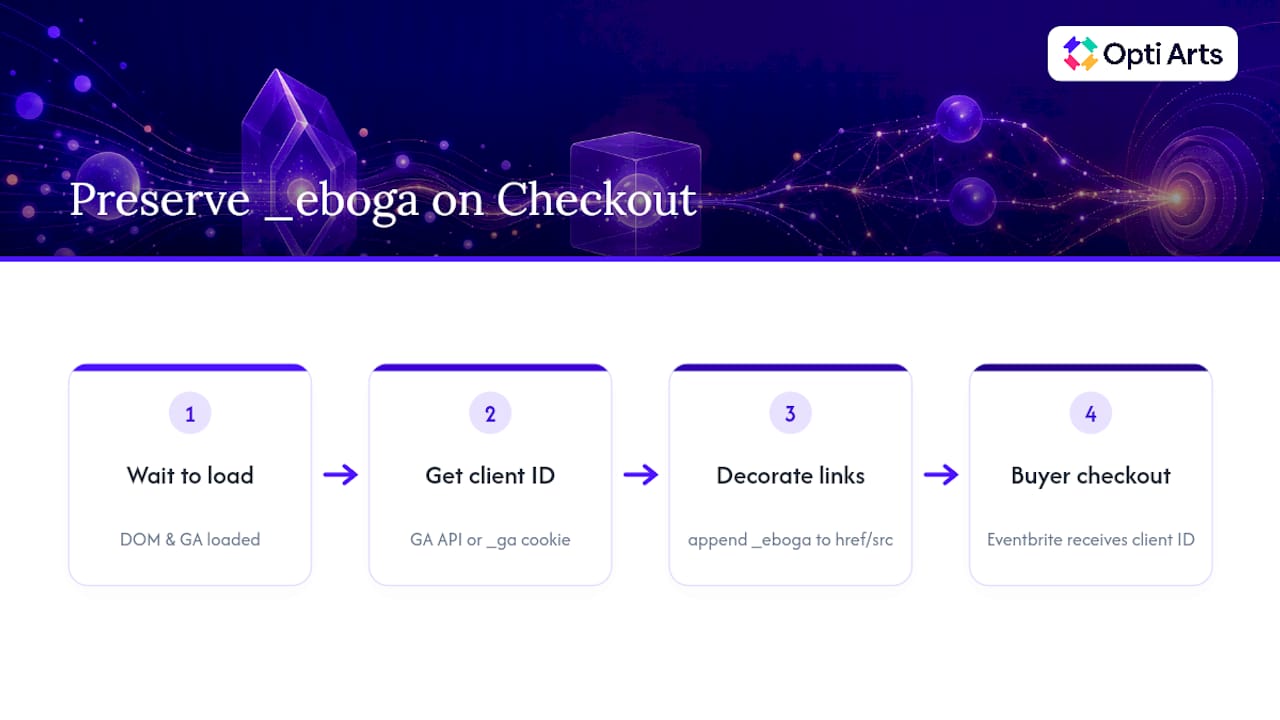
Pro Tip: Test this across every page a buyer might click “Buy Tickets” from, not just your homepage. A missed link on a landing page or email template will quietly break the chain.
One caution: if a buyer bounces across multiple Eventbrite subdomains during checkout, you can end up with more than one client ID for the same person. Test your specific funnel before trusting the data, and consider a server-side alternative if the discrepancy is significant.
How Do You Verify Eventbrite Tracking Pixels Are Firing?
Don’t assume a pasted ID equals a working pixel. Run through this checklist before you spend a dollar on ads:
Open GA4’s DebugView and confirm event_listing and purchase events appear as you move through a test transaction.
Use Google Tag Assistant to inspect whether the Google Ads conversion tag loads on the confirmation page.
Check Meta Events Manager’s test events tool for PageView and Purchase signals from the same session.
Complete a full order in incognito mode, then check your browser’s network tab for the actual pixel requests firing.
If nothing shows up, isolate the cause: privacy extensions blocking third-party scripts, a mistyped pixel ID, an embedded checkout widget that restricts injected code, or a missing Conversions API token for server-side Meta tracking.
If the pixel fires but the ad platform won’t attribute it, that’s a Google or Meta support issue. If the pixel never fires at all, that’s an Eventbrite configuration problem.
What Should You Actually Optimize Once Tracking Works?
Clicks are the easiest metric to obsess over and the least useful one for a ticketed event. Cost-per-ticket and incremental lift, meaning sales you can plausibly attribute to the campaign rather than to people who were buying anyway, tell you far more about whether a campaign earned its budget.
Pull Eventbrite conversions into GA4 or a centralized dashboard so a Meta campaign and a Google Ads campaign aren’t reported in two disconnected silos, an approach covered in more depth in this look at attribution for performing arts venues.
Turn on Meta’s Conversions API wherever it’s supported. Server-side forwarding recovers purchase signals that browser privacy settings otherwise strip from client-side pixels.
Run structured A/B tests on creative and landing flows rather than changing five variables at once.
Track both short-term cost-per-acquisition and longer attendance or retention numbers. A campaign that’s cheap per click but attracts one-time buyers isn’t the same win as one that builds a repeat audience.
Marketing teams that lean on integrated analytics rather than platform-by-platform reporting tend to see meaningfully better return on ad spend, largely because they catch wasted spend faster and reallocate it while a campaign is still running.
An Eventbrite Tracking Practitioner’s Take
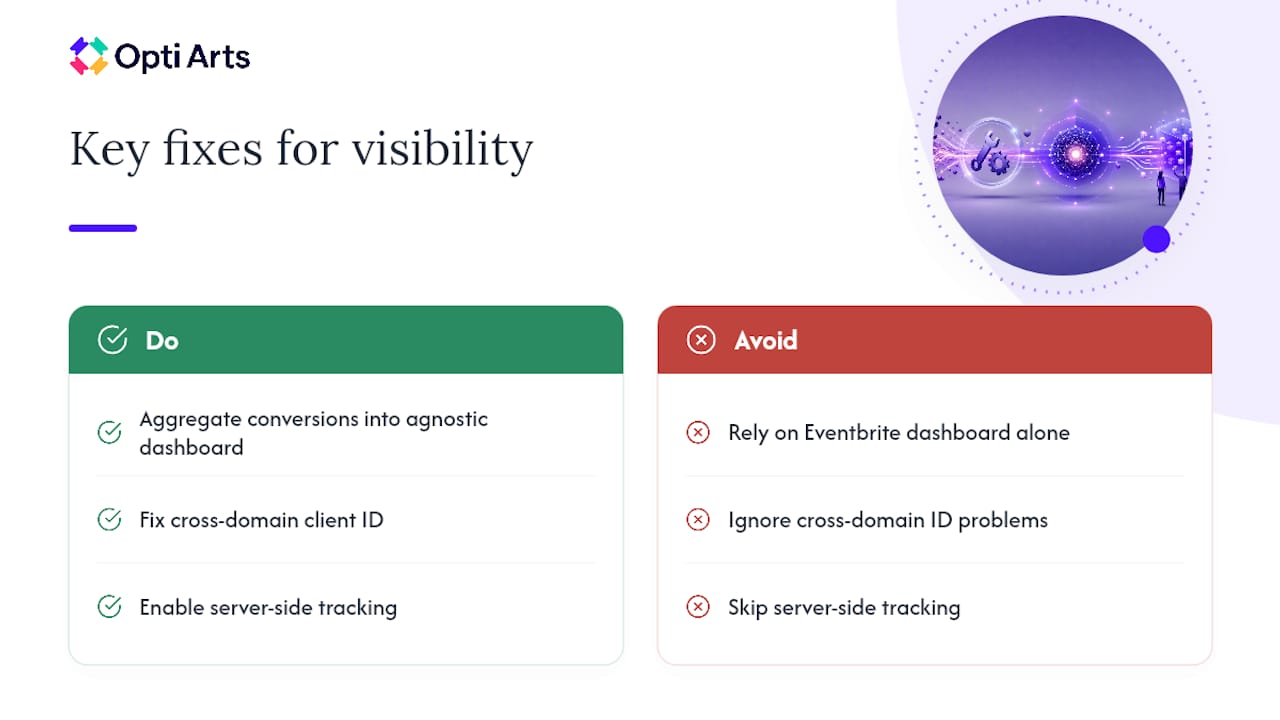
Most organizations treat Eventbrite’s built-in dashboard as the finish line, and that’s the mistake. It’s a useful pulse check, not a full ROI picture. At Opti Arts, we prioritize aggregating Eventbrite conversions into a platform-agnostic dashboard rather than reading platform-native numbers in isolation, because clicks and impressions rarely correlate cleanly with actual attendance.
The clients who see the biggest jump in visibility are almost always the ones who fixed two things: a broken cross-domain client ID and a missing server-side tracking setup. Neither fix is glamorous. Both change what the data can actually tell you.
— Trevor
Opti Arts: A Direct Path to Cleaner Eventbrite Tracking Data
Opti Arts is built for organizations that would rather have someone else wire up the tracking than debug _eboga parameters between shows. We handle campaign setup, pixel and Conversions API enablement, and Google Tag Manager configuration across Meta, Google Search, YouTube, Connected TV, and Digital Audio, so your Eventbrite data actually reflects what your campaigns are doing.

For organizations that want a single, ticketing-agnostic view of performance instead of stitching together Eventbrite’s dashboard, GA4, and ad platform reports separately, our Breakeven dashboard centralizes ticket-sales tracking in one place. Clients report clearer visibility into which campaigns actually drive attendance once tracking is corrected and consolidated. If your Eventbrite setup is generating incomplete or inconsistent conversion numbers, request a measurement audit or a Breakeven demo through our solutions page and see what a corrected setup actually reveals.
Eventbrite and Ad Platform Documentation to Bookmark
Eventbrite: Meta pixel and Conversions API
Sources
FAQ
Are Eventbrite Ads Effective for Selling Tickets?
Eventbrite Ads can effectively drive tickets sold, gross sales, and impressions, all visible directly in the campaign summary. Effectiveness depends heavily on whether you’re also tracking incremental lift rather than raw clicks, since clicks alone don’t confirm a campaign paid for itself.
How Do You Run Ads on Eventbrite?
You launch Eventbrite Ads directly from your event dashboard under Marketing Tools, setting a budget and duration for the campaign. Before spending, install your Meta pixel, GA4 measurement ID, or Google Ads conversion tag under Tracking pixels so you can measure results beyond Eventbrite’s own summary.
How Much Do Eventbrite Ads Cost?
Eventbrite Ads pricing is based on the budget and duration you set for each campaign rather than a fixed platform fee. Current specifics on budgets and spend controls are best confirmed directly in your Eventbrite Ads dashboard when you create a campaign.
Is Eventbrite Still Popular for Event Ticketing?
Eventbrite remains widely used by venues, museums, theaters, and event organizers, which is exactly why accurate ad tracking matters. A large ticketing base only helps your ROI if your Meta pixel, GA4, and Google Ads conversions are actually configured and verified.
Can Opti Arts Help Fix Eventbrite Tracking Issues?
Opti Arts sets up pixel and Conversions API configurations, wires Google Tag Manager, and centralizes Eventbrite conversion data through the Breakeven dashboard. Pricing for these services is available on request through the solutions page.
Recommended