

Facebook Ads for Theaters: Four Phase Playbook That Sells Tickets

Meta ads sell tickets reliably when you run them as a phased, measurement-first campaign rather than a single boosted post. The first move is technical: confirm your Meta Pixel and Conversions API are firing correctly, then launch your announce phase on schedule. Get tracking right, and everything downstream (targeting, creative, budget) starts compounding instead of guessing.
TL;DR:
Ensuring your Meta Pixel and Conversions API are correctly firing on key events like ViewContent, InitiateCheckout, and Purchase is critical for campaign optimization.
Building your audience through sequential phases—starting with warm Custom Audiences and lookalikes—maximizes conversion efficiency and reduces wasted spend.
Using varied creative formats and refreshing ads every two weeks helps maintain engagement and improves ad performance throughout each campaign stage.
Budgeting should include an initial testing reserve, about 10-20%, and a separate allocation for final urgency pushes within the six-week runway for paid events.
Tracking primary KPIs like cost per ticket and ROAS, alongside conversion rate, provides reliable insight into campaign success beyond vanity metrics.
Table of Contents
How Do You Set Up Facebook Ads for Events?
Selling out a show or filling a conference room isn’t a single campaign. It’s four overlapping phases, each with its own job to do and its own audience to warm up. Think of it less like a single spotlight and more like a season trailer that builds into opening night.
Here’s the sequence that consistently outperforms a flat “boost this post and hope” approach, based on the timing and budget-share logic laid out in Web Tonic’s four-phase playbook:
Announce (weeks 6 to 4 before the event). Your objective here is reach and video views, not conversions. You’re introducing the event to people who’ve never heard of it, so optimize for attention: a strong trailer, a clear date, a reason to care. This phase also seeds your retargeting pools for later.
Convert cold (weeks 4 to 2 before the event). Now you shift the objective to conversions or purchases. Anyone who watched 50% of your trailer video or engaged with your event page becomes fair game for a direct “buy now” push. This is where most of your cold-acquisition budget should land.
Retarget (weeks 2 to 1 before the event). This phase runs almost entirely on warm audiences: people who visited your ticketing page but didn’t buy, video viewers, email subscribers who haven’t converted. Messaging shifts from introduction to reminder and reassurance.
Close (final 72 hours). Urgency takes over. “Last seats,” “doors close tonight,” “final call” messaging paired with your highest-intent audiences. This is a short, sharp phase, not a slow burn.
Paid, ticketed events generally need the full six-week runway to build enough momentum across all four phases. Free events, webinars, and local single-night engagements can often compress this to about three weeks, according to Web Tonic’s timing guidance. The reason the sequence works isn’t magic: each phase generates the audience the next phase needs. Skip the announce phase and you have no video viewers to retarget. Skip retargeting and your close phase is shouting into a cold room.
Setting Up Tracking Before You Spend a Dollar
Meta’s ad delivery system can only optimize toward outcomes it can see. If your Pixel isn’t firing on the right events, or you’re missing Conversions API entirely, you’re feeding the algorithm a partial story, and it will spend your budget chasing the wrong signal.
Before you launch anything, confirm the following:
Meta Pixel fires correctly on ViewContent (someone views the event or ticket page), InitiateCheckout (someone starts buying), and Purchase (someone completes the transaction).
Conversions API is connected as a server-side backup, so purchases still get counted even when browser-based tracking gets blocked by ad blockers or privacy settings.
Your ticketing page has Open Graph tags set up so link previews on Facebook and Instagram show the right title, image, and description instead of a broken or generic preview.
Date, city, and price sit above the fold on your landing page. Sending cold traffic to a bare Facebook event page instead of a dedicated ticketing page consistently underperforms, based on Web Tonic’s phase-based playbook.
You’ve run at least one test purchase end to end and confirmed the event fired in Ads Manager within a reasonable window.
Your ticketing platform’s purchase events are mapped correctly to Ads Manager, not just logged internally.
Skipping the test purchase is the most common mistake we see. An organizer launches a campaign, sees clicks piling up, and assumes it’s working. Two weeks later they discover the Purchase event never fired because of a script conflict on the checkout page, and Meta has been optimizing for clicks with zero signal about who actually bought.
Pro Tip: Run your test purchase from a phone on mobile data, not just your office Wi-Fi. Ad blockers and tracking prevention behave differently across devices, and mobile is where most ticket buyers will actually convert.
Which Audiences Should You Target First?
Cold, broad targeting is the last stop, not the first. The most efficient path to a sold-out event runs through people who already know you before you ever pay to reach a stranger.
Build your targeting in this order:
Custom Audiences first. Past ticket buyers, your email list, people who engaged with your Facebook Page or Instagram profile, and anyone who RSVP’d “Interested” on a previous event. Treat RSVPs as warm leads worth retargeting, not as confirmed attendance.
Allocate 30 to 40% of your budget toward these warm audiences where your list size allows it. Warm audiences convert at a fraction of the cost of cold prospecting, and prioritizing Custom Audiences and Lookalikes before scaling cold spend is standard guidance from Big Tickets’ event-marketing guide.
Build 1% to 5% Lookalike Audiences seeded from your past purchasers, not your general page followers. A lookalike built from people who paid for tickets behaves very differently from one built off casual likes.
Test Advantage+ audiences once your pixel has meaningful purchase volume. Meta’s automated targeting works well when it has enough conversion data to learn from. Below a few dozen purchase events a week, it’s often still finding its footing.
Set exclusion lists so you’re not paying to show ads to people who already bought tickets or engaged heavily in the last 24 hours. Wasted impressions on converted customers are pure budget leakage.
Watch for audiences that shrink below a few thousand people. Below that threshold, delivery gets unpredictable and costs tend to spike.
The sequencing matters because each layer feeds the next. Your custom audiences generate the purchase data that makes your lookalikes accurate, and your lookalikes generate the volume that eventually makes Advantage+ worth testing.
What Creative Formats Actually Convert Ticket Sales?
Getting the creative half of this equation right is where most campaigns quietly fail. Perfect targeting pointed at a flat, generic ad still underperforms. Creative diversity carries real weight here, and it needs to change as your audience’s commitment state changes.
In the announce phase, win the first three seconds with a 15 to 30 second trailer in 4:5 or vertical format, captioned for sound-off viewing. This is your season trailer moment: quick cuts, a clear sense of what the night feels like, and the date on screen early.
By the momentum phase, shift toward proof. Speaker clips, past-attendee testimonials, behind-the-scenes rehearsal footage, or a carousel showing the lineup work better than another polished trailer. People who are still deciding respond to evidence that other people showed up and had a good time.
In the close phase, strip messaging down to convenience and urgency: “Limited seats remaining,” “Doors at 7, don’t miss curtain call,” paired with a single, unmissable CTA button.
Use mobile-first vertical video on Instagram Reels and Stories, especially if your audience skews younger.
Always include captions. A meaningful share of viewers watch with sound off.
Test 2 to 3 distinct creative hooks per ad set rather than one variant.
Refresh creative every 7 to 14 days. Frequency creep kills performance fast once the same audience has seen the same trailer five times.
Pro Tip: Keep your close-phase creative separate from your announce-phase creative in the ad account. Reusing the same trailer with a new “last chance” text overlay rarely performs as well as building urgency-specific creative from scratch.
How Much Should You Budget for Facebook Event Ads?
A $40 ticket might reasonably support $6 to $10 in total ad spend to acquire that buyer, depending on how warm your existing list is.
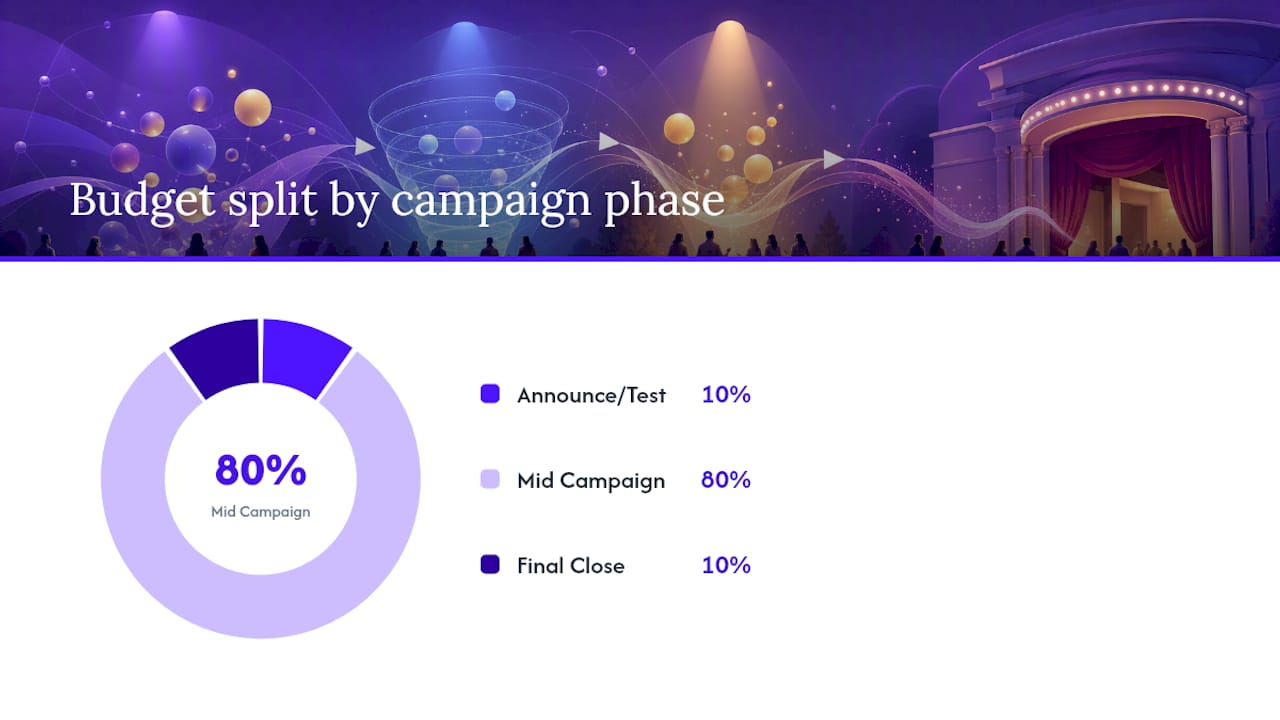
Reserve about 10 to 20% of your total budget specifically for the announcement and creative-testing window, since that’s where you’ll learn which hooks and formats are worth scaling. Hold back another 10 to 20% for the final 72-hour close. This practice is recommended in Web Tonic’s budget guidance, so you have fuel left to push last-minute seats rather than running dry right when urgency peaks.
Sample ranges by event size, assuming a six-week runway for paid events:
These are starting points, not fixed rules. A venue with a large existing email list can spend less to hit the same seat count than a first-year event with no warm audience at all. The budget-share logic matters more than the absolute dollar figure: front-load enough for testing, protect a reserve for the close, and resist the urge to spend it all evenly across six weeks.
Structuring Campaigns for Cleaner Optimization
A lean three-campaign architecture keeps your account manageable and preserves the learning signal Meta’s algorithm needs to optimize well, an approach Big Tickets recommends for teams without a dedicated ad ops person.
Cold prospecting campaign. Two to three ad sets targeting lookalikes and broad interest-based audiences, optimized for conversions once you have baseline pixel data.
Warm conversion campaign. Ad sets built from video viewers, page engagers, and event-page visitors who haven’t purchased, running conversion-optimized creative.
Post-purchase engagement campaign. A smaller, cheaper campaign aimed at buyers, encouraging calendar adds, group joins, or upsells, which builds the foundation for next season’s list.
For retargeting windows, layer them by recency and intent: video viewers from the last 14 days, event-page engagers from the last 7 to 14 days, site visitors from the last 7 days, and checkout abandoners from the last 3 days, hit hardest since they’re closest to buying.
On optimization, keep frequency under roughly 3 to 4 within a retargeting window before rotating creative. Scale budgets in increments of 20 to 30% rather than doubling overnight, since large jumps reset the learning phase. Always exclude recent purchasers from prospecting and warm campaigns.
Pro Tip: If a warm ad set’s frequency climbs past 5 before your close phase even starts, you’ve burned that audience too early. Pull back spend there and let the announce-phase reach build a fresh pool of engagers first.
Reading Your Numbers: KPIs That Actually Matter
Cost per ticket and ROAS are the two numbers that tell you whether the campaign is actually working, not just performing well on vanity metrics. Track conversion rate alongside them, and treat CTR, CPM, and CPA as supporting signals that explain why those primary numbers move, not as goals in themselves.
Cost per ticket: total spend divided by tickets sold through paid ads specifically.
ROAS: ticket revenue generated per dollar spent, calculated against actual sales, not estimated value.
Conversion rate: percentage of landing-page visitors who complete a purchase.
CTR, CPM, CPA: useful for diagnosing where a campaign is leaking, not for declaring victory.
Meta’s own reporting will rarely match your ticketing platform’s numbers exactly. That’s Meta grading its own homework to some degree: attribution windows, view-through credit, and cross-device tracking gaps all inflate platform-reported numbers relative to reality. Export your actual attendee list and compare it against what Ads Manager claims, and lean on server-side Conversions API data as your more trustworthy source when the two disagree.
Micro-commitments after purchase, like adding the event to a calendar or joining a pre-event group, measurably improve show-up rates and give you a warm list ready for next season’s announce phase.
Opti Arts’ Take on Running This Playbook at Scale
Opti Arts built this exact phased approach into how we run Meta campaigns for museums, theaters, and concert venues, because ticket sales for cultural events behave differently than e-commerce. Our Breakeven dashboard reconciles Meta’s platform numbers against real ticketing data automatically, closing the reconciliation gap most in-house teams handle manually or not at all.
If your team is seeing low Pixel match rates, has no reliable way to verify Conversions API is working, or simply doesn’t have bandwidth for creative production across four phases at once, that’s typically the point where bringing in a specialized agency pays for itself. See our related work on driving ticket sales for performing arts venues for applied examples.
Event-Specific Ad Policy Rules You Need to Know
Meta applies its standard advertising policies to event promotion, but a few areas deserve extra attention for ticketed events specifically. Ads for events involving alcohol, adult content, or age-restricted venues need appropriate age targeting and may require additional review. Meta’s automated review system can flag event ads for misleading claims, so avoid language implying guaranteed availability (“Sold out everywhere else, buy here”) unless you can substantiate it.
Pricing transparency matters more than organizers often expect. If your ad shows a price, that price needs to match what buyers actually pay at checkout, before any late fees or add-ons appear. Discrepancies here are a common cause of ad disapprovals and, worse, buyer complaints that can hurt your Page’s reputation with Meta’s delivery system over time.
Landing pages linked from event ads need to load properly and match the ad’s claims. A landing page mismatch (an ad promoting “$25 tickets” that lands on a page listing $45) is a policy violation, not just a conversion problem.
If your event involves a cause, fundraiser, or political content, expect additional scrutiny and potential authorization requirements before your ads can run at all. Build in a few extra days before your announce-phase launch date if any of these categories apply, since manual review can add delays that a straightforward workshop or concert ad wouldn’t face.
Adjusting the Playbook for Virtual vs. In-Person Events
The four-phase structure holds for both formats, but the details inside each phase shift depending on where the event happens.
Virtual events and webinars can generally compress the whole runway to about three weeks instead of six, since there’s no venue capacity constraint forcing early commitment and the barrier to registering is lower. Creative for virtual events should emphasize convenience (attend from anywhere, replay available, no travel needed) rather than the atmosphere-driven trailer style that works for in-person shows.
In-person events, particularly single-night engagements or limited-capacity venues, benefit more from urgency messaging earlier in the funnel, since physical seat limits are a real constraint buyers understand intuitively. Location-based targeting also matters more here: layering a geographic radius around the venue on top of your Custom and Lookalike Audiences prevents wasted spend on people who’d never realistically travel to attend.
Hybrid events, where a keynote or main-stage event streams alongside in-person attendance, need separate landing pages and separate ad sets for each ticket type. Blending both audiences into one campaign muddies your Pixel data and makes it harder to tell which ticket type is actually converting.
Making Facebook Ads Work Alongside Email and Organic Social
Paid Meta ads work best as the acquisition engine sitting inside a broader promotional ecosystem, not as a standalone effort. Your event page and organic posts build a supporting layer of credibility and give retargeting campaigns more material to draw from, even though Meta is fundamentally pay-to-play for real reach, a point echoed in Time.
Sync your email list into Meta as a Custom Audience early, so subscribers who haven’t opened your announcement emails still see paid reminders. This catches the segment of your list that never engages with email but scrolls Instagram daily.
Organic posts, especially behind-the-scenes content and speaker or cast spotlights, generate the video views and page engagement that become your retargeting pools later. A post that gets meaningful organic engagement in week one gives your announce-phase ads a head start, since Meta’s delivery system already has signal that people find the content worth watching.
Cross-post your paid creative as organic content too. A trailer running as a paid ad in the announce phase can double as an organic post, extending its reach to existing followers without additional spend, while still feeding the same video-view retargeting audience your paid budget is building.
Why Ticket Sales Beat Awareness as the Real Goal
Most conventional advice on Facebook event marketing still treats reach and engagement as the finish line. That’s backwards for anything with a box office attached. A thousand “Interested” clicks mean nothing if 40 people show up on the night, and organizers who optimize for engagement metrics often discover this the hard way, right around curtain call.
The more useful lens is commitment state, not awareness level. Planners want detail early: dates, pricing, what to expect. Deciders respond late to proof and urgency. Treating your entire audience as one undifferentiated group and running the same message at every stage is the single biggest inefficiency in how most organizations run these campaigns.
What we’d prioritize first, based on everything above: get tracking right before touching creative, since no amount of clever messaging fixes a broken Pixel. Then build the warm-to-cold audience sequence in order. Skipping straight to broad targeting because it feels faster is the most common way organizers burn budget without building the retargeting pools that make the close phase actually work.
— Trevor
Get a Campaign Audit Before Your Next Show Goes on Sale
If reading through four campaign phases, audience layers, and tracking checklists sounds like more than your team has bandwidth for, that’s exactly the gap Opti Arts fills for cultural organizations. We build and manage these campaigns end to end across Meta, Google, and Streaming TV, with performance tracked through a dashboard built specifically for ticket sales.

A demo or audit with Opti Arts typically covers:
A review of your current Pixel and Conversions API setup to spot tracking gaps
A sample phased media plan sized to your venue and ticket goals
A walkthrough of the Breakeven dashboard so you can see ticket sales reconciled against ad spend in real time
If you’d rather have this playbook executed for you than run it yourself, visit Opti Arts’ solutions page to book a campaign audit and see what a managed, data-driven approach looks like for your next event.
Sources
Recommended