

Event Organizers, Stop ROAS Blind Spots With Offline Ticket Conversions


Offline conversions for tickets are purchases, phone orders, or box office check-ins that happen away from the ad click but still deserve credit in your reporting. The best-practice fix is to capture first-party identifiers, like email, phone, or GCLID, at the point of purchase and upload that hashed data through Google’s Data Manager API, Meta’s Conversions API, or a secure CSV workflow. Smaller teams can lean on ticketing-platform automations or middleware instead of building custom pipelines from scratch.
TL;DR:
Accurate offline conversion tracking relies on capturing and hashing first-party identifiers like email, phone, and GCLID at the point of purchase to enable matching.
Most ticket purchases at venues occur offline, making it crucial to link these transactions back to ad interactions for correct attribution and better ROAS metrics.
Using Google’s Data Manager API or Meta’s Conversions API for uploads allows near-real-time matching, but manual CSV uploads introduce delays of a day or more.
Regular reconciliation of uploaded conversions with actual ticket revenue every two weeks helps identify and fix data mismatches or formatting issues.
Proper data hygiene—such as normalizing, removing duplicates, and standardizing timestamps—is essential to ensure high match rates and trustworthy offline attribution results.
Table of Contents
What Counts as an Offline Ticket Conversion?
Any sale that finalizes outside the ad platform’s own tracking pixel qualifies. That’s a wider net than most marketing teams assume, and it’s the reason ROAS numbers for performing arts and museum campaigns often look worse than reality.
Common examples include:
Box office window sales, where a patron clicks an ad, thinks it over, then buys in person days later.
Phone orders taken by a box office staffer reading ticket details off a call.
Third-party reseller transactions that get reconciled into your system after the fact.
Pre-sale or will-call orders that get updated or upgraded after the original online session ends.
Each of these breaks the digital thread that ad platforms rely on for bidding. If a theater’s Google Ads account only sees the online transactions, its algorithm is optimizing against a partial picture. That skews budget decisions toward channels that show clean digital attribution and away from channels, like connected TV or Spotify audio, that often drive an offline visit or call instead of an instant click-through. Fixing that gap is the entire point of offline conversion tracking.
How Does Attribution Matching Actually Work?
Matching an offline sale back to an ad impression comes down to identifiers, not guesswork. Google and Meta both rely on the same core idea: if you can hand them something that ties a purchase to a person who interacted with an ad, they’ll credit the right campaign.
The mechanics break down into four pieces:
GCLID capture. When someone clicks a Google ad and lands on your ticket page, that click carries a Google Click Identifier. Store it in a hidden field or session variable, attach it to the resulting order record (even if the sale finalizes at the box office two weeks later), and you have the thread you need for upload.
Enhanced conversions and hashed identifiers. Google’s enhanced conversions and Meta’s offline conversions both use SHA-256 hashed emails and phone numbers to match purchase records against users who saw or clicked an ad, even without a GCLID present.
Upload method trade-offs. The Data Manager API handles high-volume, near-real-time syncing well, which matters for a fast-selling on-sale event. Legacy API calls and manual CSV uploads still work but introduce latency, sometimes a full day or more before conversions show up in reporting.
Accuracy factors. Match rates depend on sample size, how complete your PII fields are, and how many buyers move across devices between the ad click and the eventual purchase.
Pro Tip: Run a small test batch of 50 to 100 records before your first full upload. Catching a formatting error in a sample saves you from silently losing weeks of match data.
A large share of ticket purchases, particularly in categories like film, still happen at the box office rather than online, which is exactly why this matching layer carries so much weight for cultural organizations specifically.
Step-by-Step Setup Checklist for Ticket Sales Tracking
Building this correctly the first time saves you months of reconciling bad data later. Follow this order.
Capture identifiers at the point of purchase. Every ticket order, box office, phone, or online, should record email, phone, order ID, purchase timestamp, and GCLID (when available) in the same system.
Standardize and hash fields. Lowercase and trim emails, format phone numbers consistently, and hash identifiers with SHA-256 per each platform’s specification before anything leaves your system.
Choose your upload path. High-volume venues running frequent on-sales should lean toward the Data Manager API. Smaller organizations running a handful of shows a season can manage fine with scheduled CSV uploads or a ticketing integration that automates the sync, like Eventbrite’s connectors that push order events into Google Ads.
Map conversion actions and settings. Set the right conversion window (most performing arts sales cycles justify 30 to 90 days), assign attribution settings, and tag conversions by campaign and UTM so you know which creative or platform gets credit.
Validate before trusting the data. Run a test upload, confirm the matched conversion count appears in platform reporting, and reconcile that number against actual ticketing revenue from your box office system.
Pro Tip: Set a recurring calendar reminder to reconcile uploaded conversions against your ticketing platform’s revenue report every two weeks during an active on-sale. Drift between the two is usually the first sign something in the upload pipeline broke.
Skipping step five is the single most common mistake we see. Teams build the pipeline, watch conversions appear in Google Ads, and assume everything is fine, without ever checking whether the counted conversions match actual box office revenue.
Fixing the Data Hygiene Problems That Break Matching
Most failed matches trace back to formatting inconsistencies, not platform limitations. The fixes are mechanical, but they have to happen before every upload, not once at setup.
Normalize every email to lowercase and trim whitespace; normalize phone numbers to E.164 format wherever your ticketing system supports it.
Flag and remove duplicate records, especially when a patron buys through both your site and a reseller for the same event.
Reconcile third-party and reseller sales against your own CRM before uploading, so the same buyer doesn’t get counted, and credited, twice.
Standardize timestamps to a single time zone (UTC is safest) and use the original order timestamp, not the upload timestamp, as the conversion time.
Google’s own guidance on offline conversion imports recommends automated pre-upload normalization for exactly these fields, and for good reason: manual cleanup at scale is where errors creep in fastest.
Pro Tip: Automate the cleaning steps, but schedule a manual spot check on 20 random records each month. Automated rules occasionally miss edge cases, like international phone formats, that only a human catches.
Which Metrics Actually Shift Once Offline Data Comes In?
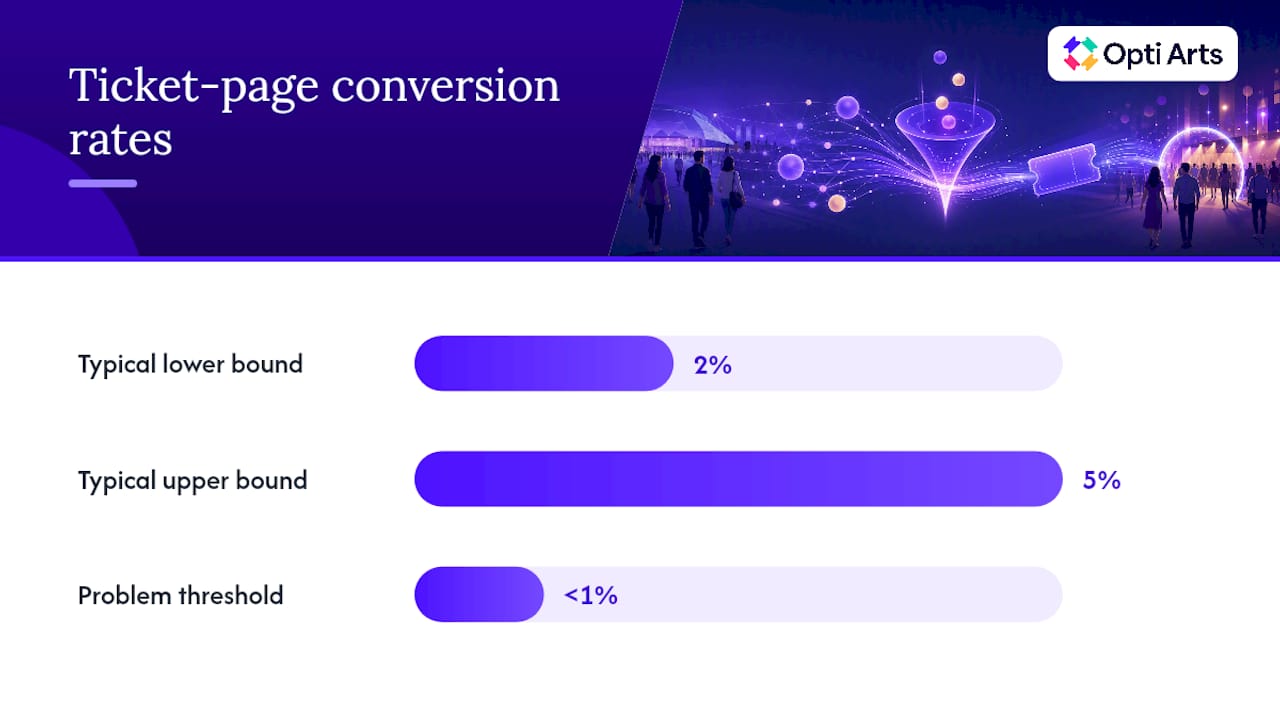
Six numbers tell you almost everything about a ticket campaign’s health: sales velocity, ticket-page conversion rate, average order value, sell-through rate by seating tier, cart abandonment rate, and show-up rate on event night. Conversion rates on a well-built, self-hosted event page typically land between 2% and 5%; anything under 1% signals a checkout or targeting problem worth investigating immediately.
Importing offline conversions changes how you read every one of those numbers. That shift often means:
Cost-per-acquisition drops once offline purchases get folded into the same reporting window.
Bid strategies that looked underperforming may deserve more budget, not less.
A high abandonment rate paired with strong offline sales suggests people research online, then decide to buy by phone or in person.
Check these numbers weekly during a normal sales cycle, then daily in the final week before curtain-up, when velocity swings fastest and budget decisions matter most.
Choosing the Right Integration Pattern for Your Ticketing Stack
The right setup depends on sale volume and how much engineering support you have on hand, not on which tool sounds most sophisticated. Three patterns cover almost every cultural organization.
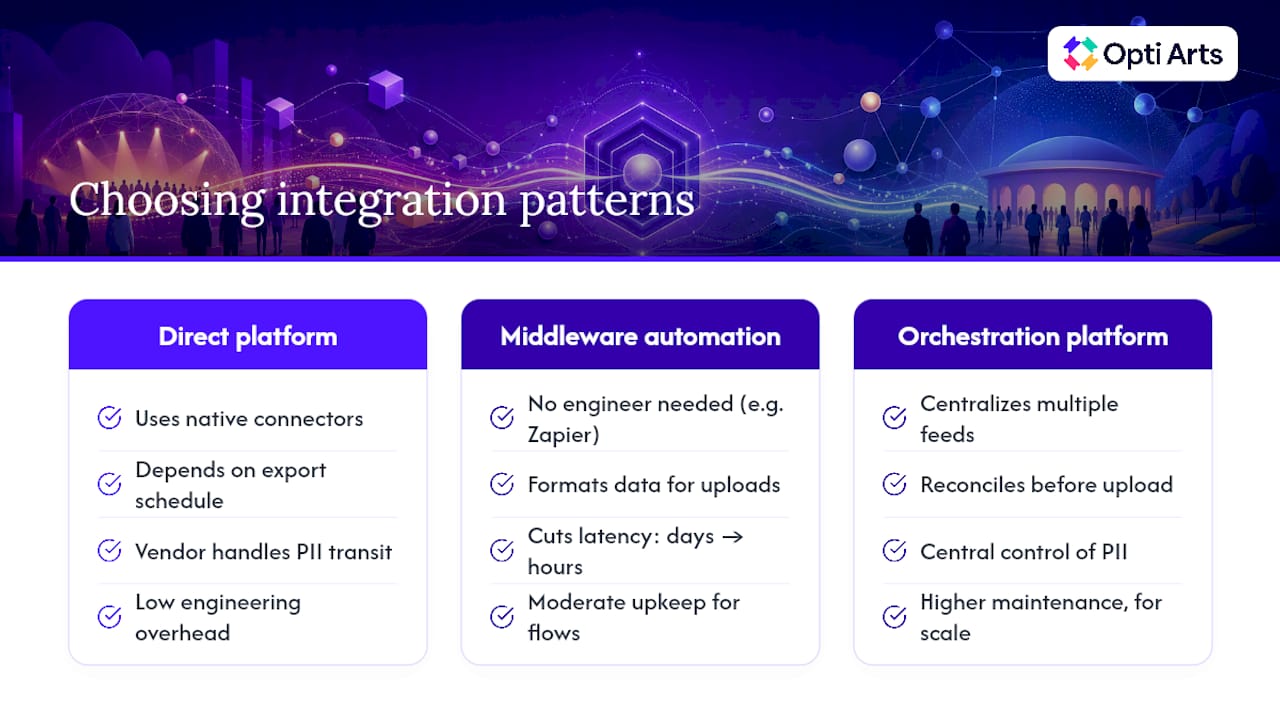
Direct platform integrations work well when your ticketing system already exports order or attendee data on a schedule. Eventbrite, for instance, supports connectors that automatically push new events or check-ins into ad platforms without custom code.
Middleware automation fills the gap for teams without an engineering resource. A Zapier flow that watches for new Eventbrite orders and formats them for upload to Google Ads or Meta’s Conversions API can replace a manual CSV process entirely, cutting the latency between sale and upload from days to hours.
Orchestration platforms make sense once you’re juggling multiple box office systems, resellers, and online storefronts at the same time. Tools built specifically for ticket data reconciliation, such as RealCount, centralize those feeds into one source of truth before anything reaches an ad platform.
Before committing to any pattern, weigh four factors: upload latency, how PII gets handled in transit, what happens when an upload fails, and how much ongoing maintenance the workflow will demand from your team.
What Privacy Rules Apply to Offline Ticket Data?
Treat attendee data with the same care you’d want applied to your own information. Always hash identifiers per each platform’s required standard and transmit everything over HTTPS, never plain text. Confirm you have a legitimate basis, typically the purchase transaction itself, before uploading a buyer’s identifiers to an ad platform.
Keep the fields you upload to the minimum needed for matching, document your retention policy, and restrict access to the upload process to people who actually need it. Maintain an upload log. When a match rate suddenly drops or a campaign’s numbers look off, that log is what lets you trace the problem back to a specific batch instead of guessing.
Three Lessons From Running Ticket Campaigns
The most common breakage is formatting drift, not platform failure, and the fix is small test batches before every full upload. Reconciling uploaded conversions against actual box office revenue every two weeks catches bidding missteps before they cost real budget. If your team wants a second set of eyes on a setup, Opti Arts works with cultural organizations on exactly this problem.
— Trevor
How Opti Arts Handles Offline Conversion Setup
Some marketing agencies provide teams that know how box office systems, will-call orders, and reseller reconciliation actually behave, instead of learning ticketing quirks on your dime. There are services that build and maintain the connection between your ticketing data and your ad accounts directly, as an alternative to piecing together your own upload pipeline from scattered help docs.

Our services cover the hands-on setup of Data Manager API and Conversions API uploads, ongoing reconciliation so your numbers stay trustworthy, and a live dashboard through Breakeven that shows real-time ticket sales, pacing, and campaign performance in one place. If you’re running paid campaigns across platforms like Meta, Google, Spotify, or streaming TV and want to understand how much of your box office activity those ads actually drove, you can request a demo of analytics tools that map offline conversion data against your ad spend.
Where to Go Next for Implementation Details
Google’s own offline conversion imports guide covers Data Manager API setup and field requirements in full.
Meta’s Business Help Center article on offline conversions explains matching logic and required identifiers.
For automation examples, review Eventbrite’s Zapier integration and pair it with a Google Ads copy generator when testing new creative alongside your tracking setup.
Sources
FAQ
What Does “Offline Conversions” Mean?
Offline conversions are actions, like a ticket purchase, that happen outside an ad platform’s direct tracking (in person, by phone, or through a reseller) but get matched back to an ad interaction using identifiers like a hashed email or GCLID.
How Do You Set Up Offline Conversion Tracking?
Capture email, phone, order ID, and GCLID at the point of sale, hash and standardize those fields, then upload them through Google’s Data Manager API, Meta’s Conversions API, or a scheduled CSV import mapped to the correct conversion action.
Is $20 a Day Enough for Google Ads on a Ticket Campaign?
A $20 daily budget can work for a small, single-venue event with a narrow local audience, but most performing arts and museum campaigns need more spend to gather enough conversion volume for reliable bidding signals, especially once offline sales get factored in.
What Are Offline Events in Ad Platform Terminology?
An offline event is any tracked action, purchase, check-in, or phone order, that gets uploaded to an ad platform after the fact rather than captured automatically by an on-site tracking pixel.
Which Ticketing Metrics Matter Most Once Offline Data Is Included?
Sales velocity, conversion rate, average order value, sell-through by tier, cart abandonment, and show-up rate all shift once offline purchases are added, often revealing a stronger true ROAS than online-only tracking shows.
Recommended