

Cut YouTube Ads Cost: 2026 Benchmarks and 30–90 Day Plan for Marketers

Updated: 3 days ago

Most advertisers pay within a low-cent range per view (CPV) or a few dollars to several tens of dollars per thousand impressions (CPM), depending on format and targeting, according to MarqOps and Groas. Those numbers matter less than what they buy you: for any campaign built to drive ticket sales, sign-ups, or purchases, cost-per-acquisition (CPA) and return on ad spend (ROAS) are the only figures that should decide whether a campaign is working, per Google Ads Help.
TL;DR:
Campaign success depends more on cost-per-acquisition and return on ad spend than on low CPV or CPM, especially when optimizing for conversions.
Bidding strategies, targeting accuracy, creative quality, and seasonality are primary drivers of YouTube ad costs and campaign effectiveness.
Different ad formats have distinct billing rules and length limits; mixing formats improperly can cause budget waste and underperforming reach.
A realistic YouTube ad budget should focus on testing creative and audience segments over 30 to 90 days with clear stop and scale triggers.
Creative quality, proper targeting, and tracking setup are critical for lowering effective costs and accurately measuring ad ROI.
Table of Contents
How Much Do YouTube Ads Cost? The Metrics That Actually Matter
Every YouTube pricing conversation starts with an alphabet soup of acronyms, and most marketing teams never get a straight answer about which one to watch. Here’s the short version: CPV and CPM tell you what you’re paying for attention. CPA and ROAS tell you whether that attention turned into money. Chasing a low CPV while ignoring CPA is how a lot of ad budgets quietly disappear.
Cost-per-view (CPV) is what YouTube charges when someone watches at least 30 seconds of your ad, or the whole thing if it’s shorter, or when they click on it, according to Google Ads Help. It’s the default billing model for skippable in-stream ads and applies only to campaigns built for consideration or engagement, not straight conversions.
Cost-per-mille (CPM) charges you per thousand impressions regardless of whether anyone watched. It’s the model for bumper ads, non-skippable placements, and most awareness-first buys where reach matters more than watch time.
Cost-per-click (CPC) shows up mostly in video action campaigns, where you pay when someone clicks through to your site or landing page rather than simply viewing.
Cost-per-acquisition (CPA) is the number that should sit at the top of every report: what you paid, on average, for each conversion, whether that’s a ticket purchase, a lead form, or a completed checkout.
Here’s where the 2026 benchmarks land, directionally:
CPV: generally low per-view costs for most campaigns, higher in competitive verticals or tightly targeted audiences, per MarqOps and Groas.
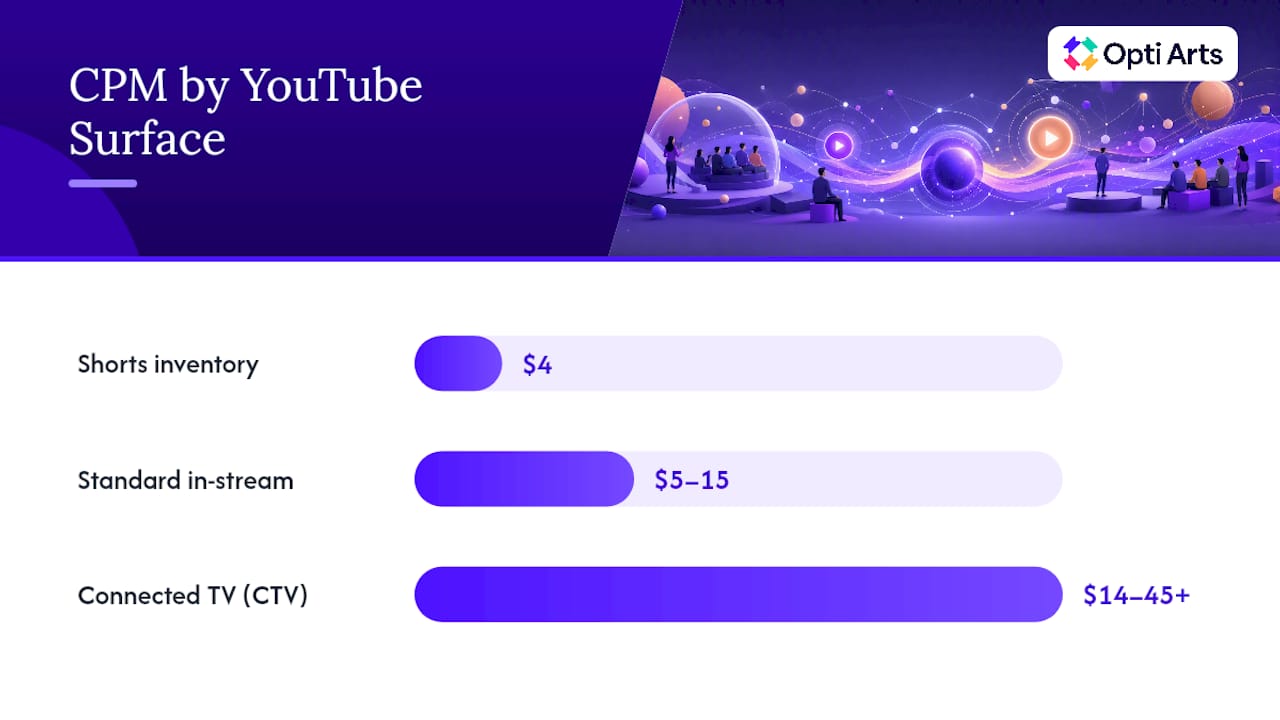
CPM: around $4 for Shorts inventory, $5 to $15 for standard in-stream video, and $14 to $45 or higher on connected TV (CTV) placements.
CPA: varies widely by industry and offer, depending largely on conversion rate, offer strength, and audience quality rather than solely the underlying CPV.
Pro Tip: Don’t evaluate a YouTube proposal on CPV alone. Ask the media planner what CPA or ROAS target the campaign is built around, and make them show the math connecting the two.
One wrinkle catches a lot of advertisers off guard: when you let a single campaign optimize freely across Shorts, in-stream, and CTV inventory, YouTube’s delivery system tends to drift toward whichever surface is cheapest to fill. That can produce a beautifully low blended CPM on your invoice while quietly starving the CTV or in-stream reach you actually wanted, a pattern MarqOps flags as a common source of confusion when campaign performance doesn’t match the report. If reach on a specific surface matters to your goal, don’t let “optimize everywhere” default settings decide that for you.
YouTube Ad Formats and How Each One Bills You
Format choice is a budgeting decision disguised as a creative one. Each format carries its own billing rule, its own length constraints, and its own price tier, and mixing them up in a media plan is one of the fastest ways to blow a budget on the wrong inventory.
Skippable in-stream ads bill on CPV. Viewers can skip after five seconds, so you only pay for genuine engagement. These run anywhere from 12 seconds to several minutes, though most effective creative stays well under a minute.
Non-skippable in-stream ads bill on CPM, capped at 15 to 20 seconds. Because viewers can’t skip, this format commands a premium, and that premium gets steeper in high-demand periods.
Bumper ads are 6-second, CPM-billed spots designed for pure reach and frequency, not consideration. They’re inexpensive per impression but need a very tight creative hook since there’s no room for a slow build.
In-feed ads (formerly discovery ads) appear in search results and the homepage feed, billed on a per-click or per-view basis depending on campaign type, and depend heavily on a compelling thumbnail and headline.
Shorts ads run in the vertical feed and typically carry the lowest CPM of any format, around $4 on average, but demand native, vertical-first creative or they get skipped almost instantly.
CTV placements put your ad on the living room screen, and that premium living room attention costs accordingly: $14 to $45+ CPM territory, per MarqOps.
Masthead placements are the homepage takeover, typically sold on a cost-per-day (CPD) or reserved CPM basis rather than through the standard auction, according to La Factory. This is the highest-cost format on the platform and usually only makes sense for major launches with real reach targets.
Format billing rules and length specs are documented directly by Google Ads Help, and it’s worth checking those specs before your creative team builds anything, because a 20-second non-skippable cut and a 6-second bumper cut are not the same creative brief.
Aspect ratio discipline matters more than most media plans admit. A horizontal ad dropped into Shorts inventory without a vertical edit will underperform on view rate no matter how good the concept is, and that underperformance shows up as a worse effective CPV even though your bid didn’t change.
What Actually Drives Your YouTube Ad Cost
CPV and CPM aren’t fixed prices. They’re auction outcomes, and four levers move them: how you bid, who you target, how good your creative is, and when you’re running the campaign.
Bidding strategy. Google Ads offers Target CPM, Target CPA, Maximize Conversions, and a handful of other bid types, and each one tells the auction a different story about what you’re willing to pay and for what outcome, per Google Ads Help. Target CPA bidding, for instance, will often accept a higher CPV in exchange for showing your ad to viewers more likely to convert, which is the trade most performance advertisers should be making.
Targeting precision. Custom intent audiences, in-market segments, and remarketing lists all cost more per view than broad demographic targeting because you’re competing for a smaller, more valuable pool of attention. The payoff is usually a lower CPA even at a higher CPV, since you’re paying more per view but converting a larger share of those viewers.
Creative quality. The first five seconds of your ad determine most of what happens next. Weak hooks produce high skip rates, and Google Ads Help’s guidance on view rate makes clear that a stronger opening consistently improves both view rate and downstream conversion performance.
Seasonality. Q4 retail demand pushes CPMs up across nearly every format as advertisers compete for the same holiday shopping attention, while January and February tend to be the cheapest months to test, particularly for non-skippable inventory.
Pro Tip: If you’re planning a non-skippable test, run it in a low-demand month first. Testing new formats for the first time during Q4 means paying peak prices to learn basic lessons you could have learned in February for less.
Building a YouTube Ad Budget You Can Actually Test
A YouTube budget only works if it’s sized to teach the algorithm something before you run out of money. Too small, and you never get enough conversions for automated bidding to learn your audience. Too diffuse, and you spread spend across formats so thin that no single one gets a fair test.
Set a daily minimum tied to your CPA target. Industry guidance points to roughly $20 to $50 per day for a small initial test and $3,000 to $10,000 per month per campaign to give automated bidding strategies enough conversion volume to optimize reliably, according to JoinBrands. If your target CPA is $40, a $20 daily budget won’t generate enough conversions in a week to tell you anything.
Run a 30 day creative sweep first. Test three distinct creative hooks against the same audience for 7 to 10 days each, tracking view rate and click-through rate to find your strongest opener before you spend heavily anywhere.
Follow with an audience sweep. Take your winning creative and run it across two or three candidate audiences, roughly two weeks each, to find which segment produces the lowest CPA rather than just the lowest CPV.
Scale into days 60 through 90. Once you’ve identified a winning creative and audience pair, shift budget into lookalike or seeded custom-intent audiences and let the campaign run under a defined CPA ceiling rather than a fixed daily spend.
Set explicit stop and scale rules before you start. Decide in advance what CPA trend, frequency cap, or view rate drop triggers a pause, so you’re not making that call emotionally three weeks into a campaign that’s already bleeding budget.
Track four numbers through every phase: conversion count, view rate, frequency, and CPA trend week over week. If frequency climbs past 3 to 4 within your target audience while CPA is also climbing, you’ve likely saturated that segment and it’s time to rotate creative or expand reach.
Turning View Metrics Into ROAS: The Math That Matters
CPV and CPM are attention prices. CPA and ROAS are business outcomes, and the gap between the two is where most YouTube budgets either prove their worth or quietly fail.
The math is simple once you set it up. If your CPV is $0.05 and your video-to-conversion rate is 1%, your CPA is $5 ($0.05 divided by 0.01). If that same $0.05 CPV converts at only 0.2%, your CPA jumps to $25, a fivefold difference driven entirely by conversion rate, not by the price you paid per view. A cheap CPV attached to a weak landing page or a mismatched audience can produce a CPA that’s worse than a more expensive CPV paired with a tight funnel, a point Groas raises directly.
View-through conversions count someone who saw your ad without clicking and later converted, which inflates YouTube’s reported conversion numbers relative to what a last-click model would show.
Attribution windows on YouTube campaigns typically extend several days past the impression, so a conversion attributed to your video ad might have happened regardless of the ad’s influence.
Cross-channel de-duplication is the practical headache: if the same person also saw a Meta ad and a Google Search ad before converting, multiple channels may claim credit for a single sale unless your attribution setup accounts for it.
Set your attribution windows deliberately, and compare view-through-heavy reporting against a more conservative last-click view before you decide a campaign is working. Reading how ROAS calculations actually work is worth ten minutes before your next budget review.
Practical Ways to Lower Your Effective YouTube Ad Cost
You don’t lower YouTube costs by negotiating a lower CPV. You lower them by wasting less of every dollar you already spend.
Tighten your first five seconds. A hook that states the offer or the hook line immediately reduces skip rate, and reducing skip rate directly improves effective CPV.
Build native Shorts creative instead of repurposing horizontal video. Vertical-first cuts consistently outperform cropped landscape ads in Shorts feeds.
Lock your format mix instead of letting the campaign optimize freely across every surface. This prevents delivery from drifting entirely into the cheapest inventory at the expense of your intended reach.
Set frequency caps. Showing the same viewer your ad more than four or five times in a short window burns budget on diminishing returns.
Use remarketing on CPV bidding for warm audiences who’ve already engaged with your channel or site, since they typically convert at a meaningfully lower CPA than cold prospecting audiences.
Switch to conversion-based bidding once you have enough data. Target CPA or Maximize Conversions strategies generally outperform manual CPV bidding once a campaign has logged enough conversions to optimize against.
Use structured campaign naming and first-party audience lists. This sounds administrative, but it’s what lets you actually compare performance across a 90-day test instead of guessing which change caused which result.
Pro Tip: Before you touch bids or budgets, audit your last 30 days of creative performance. Most cost problems on YouTube are creative problems wearing a targeting disguise.
How Opti Arts Applies These Rules for Cultural Organizations
Opti Arts builds YouTube campaigns for museums, theaters, and performing arts organizations using the same budgeting logic covered above, applied to the specific rhythms of season trailers and single-night engagements. Digital marketing campaigns can run across Meta, Google, YouTube, Spotify, and streaming TV, with creative and media strategy built around each institution’s actual goals and budget rather than a one-size template.
A ticket sales tracking dashboard can tie YouTube performance directly to ticket sales data, so a curtain-up date isn’t just a media milestone, but a number the box office can see in real time. A typical test plan for cultural organizations may follow a phased structure: creative testing across trailer cuts, an audience sweep across subscriber lists and lookalike segments, then a scaling phase built around a target cost per ticket rather than a target CPV.
Marketing managers monitor a small set of dashboard KPIs rather than a wall of ad metrics:
Cost per ticket sold, tracked against target CPA
ROAS by campaign and by creative variant
View rate and frequency by audience segment
Ticket sales lift attributed across channels, not just YouTube in isolation
Reading Your YouTube Ads Bill Without Getting Lost
YouTube ad spend appears inside your Google Ads billing summary, broken down by campaign, not by individual video, which is where a lot of confusion starts. Each line item reflects actual billable events: views that crossed the 30-second or full-video threshold under CPV billing, or impressions served under CPM billing, per Google Ads Help.
Check the campaign-level breakdown first, since a blended account total hides which campaign is actually eating your budget. If you’re running multiple bid strategies across campaigns, cross-reference each campaign’s billing against its bid type. A Target CPA campaign showing a cost spike alongside a stalled conversion count is an early warning sign worth catching before the billing cycle closes, not after.
Google Ads issues invoices either on a monthly cycle or once you cross a spending threshold, depending on your account’s payment settings, and automatic payments draw from your linked payment method as costs accrue rather than in one lump sum at month’s end. If you’re managing spend through an agency or a media buying team, ask for campaign-level exports rather than a single account total. That level of detail is what lets you actually connect a billing line to a specific creative test or audience segment instead of just watching a total climb.
The Hidden Costs Beyond Your Media Spend
Your media budget is the number on the invoice. It’s rarely the number on your actual bill for the campaign.
Production costs are the biggest variable most first-time YouTube advertisers underestimate. A polished 30-second spot with professional filming, editing, and licensed music can run from a few thousand dollars into five figures, while a native-feeling Shorts cut shot on a phone with a strong hook can cost almost nothing beyond staff time. Given that creative quality drives view rate and CPA more than almost any other lever, skimping here often costs more in wasted media spend than it saves in production.

Agency or management fees typically run as a percentage of media spend, a flat monthly retainer, or a project fee, depending on the scope of strategy, creative, and reporting work involved. Landing page and creative asset costs sit outside the ad platform entirely but directly affect the conversion rate that determines your real CPA. Data and tagging setup, like conversion tracking and attribution tools, carries its own setup cost, and skipping it means flying blind on the exact ROAS numbers you need to judge whether any of the rest of this spending was worth it.
When YouTube Deserves the Lead Role
YouTube earns a lead role when you have a visual story worth telling and enough budget to run a real test, not just a few hundred dollars scattered across a week. As a supporting channel, it’s excellent for retargeting warm audiences at a lower CPA than cold prospecting almost anywhere else.
Before committing budget, confirm three things: a creative team that can produce and rotate hooks regularly, conversion tracking that’s actually configured, and a leadership team comfortable with a 60 to 90 day learning curve before judging results. Watch your CPA and ROAS, not your CPV. A cheap view that never converts isn’t cheap.
— Trevor
Get Help Planning Your YouTube Ad Budget
Building a YouTube strategy that connects view metrics to ticket sales is the kind of service offered for museums, theaters, and performing arts organizations. This approach builds the creative, targeting, and testing plan around actual box office numbers and shows the results in one dashboard instead of scattered platform reports.

Campaigns run across YouTube alongside Meta, Spotify, and streaming TV, with strategy tailored to each institution’s calendar of single-night engagements and full-season pushes. The Breakeven dashboard ties every campaign back to real ticket sales, so you’re judging performance by cost per seat filled, not cost per view. If you want a second opinion on a YouTube proposal or help building a 90-day test plan around your next season, visit Opti Arts’s solutions page to request a demo and see how the dashboard reports on your own campaigns.
Sources
Recommended