

Ticketing First: Server Side Tagging for Marketers and Developers
- Cam Collier
- 3 days ago
- 8 min read


Server-side tagging routes event data through a server container you control instead of letting a browser fire requests straight to every vendor. That single change cuts client-side load, gives you a checkpoint to strip personal data before it leaves your infrastructure, and improves the accuracy of what lands in GA4 or your ad platforms. Consider a migration once client-side tracking starts failing due to ad blockers, browser restrictions, or attribution gaps you can’t explain.
TL;DR:
Server-side tagging consolidates event data routing through your own cloud-based container, reducing browser load and enabling better data control.
Setting up involves creating a separate server container, choosing automatic or manual deployment, and mapping a custom subdomain for durable first-party cookies.
Dual-tagging GA4 in parallel with client-side tracking is essential for verifying data accuracy before fully switching over.
Traffic scaling requires managing infrastructure, limiting cold starts, and controlling costs, which typically range from $30 to $50 per server monthly at moderate volume.
Prioritize key conversion events like ticket sales and ensure cookie compliance early to improve cross-session attribution and data reliability.
Table of Contents
How Does Server-Side Tagging Work?
Server-side tagging runs on a two-container model. A web container, the familiar Google Tag Manager setup, still lives in the browser and fires events. But instead of those events hitting Meta, Google Ads, and GA4 directly, they land in a server container you host in the cloud.
Inside that server container, clients act as adapters. A client examines each incoming HTTP request, decides whether it recognizes the format (a GA4 hit, a Meta Pixel call), and claims it. Once claimed, the client parses the raw request into a structured event.
From there, server containers accept those parsed events and hand them to tags and triggers, which decide where the data goes next: GA4’s Measurement Protocol endpoint, an ad platform’s conversion API, or a custom warehouse.
A few architectural pieces do most of the work:
Clients claim and normalize incoming requests into events.
Tags in the server container send that event data to the vendors you specify.
Triggers and variables control when a tag fires and what data it uses.
A custom subdomain mapped to your server lets it set first-party cookies, which matters because first-party cookie durability depends on that subdomain mapping.
What Are the Real Benefits of Server-Side Tagging?
The performance gain is the easiest to measure. Instead of a browser opening a dozen connections to a dozen third-party domains, it sends one HTTP request to your server container, which then fans the data out server-side. Google frames this shift as moving resource-intensive processing off the browser and onto infrastructure you control, which is also where the privacy and data-quality gains come from.
Pro Tip: Use the server container as a scrubbing point, not just a relay. Strip IP addresses, hash emails, or drop parameters entirely before they reach a vendor tag, rather than trusting each vendor’s own redaction settings.
The concrete gains break down like this:
Performance: one client request replaces multiple third-party script calls.
Privacy control: you enforce consent and PII stripping in one place instead of per vendor.
Data quality: you validate and normalize events server-side, reducing malformed hits that break attribution.
Trade-offs: you take on infrastructure to maintain, a small amount of added latency, and ongoing monitoring that a pure client-side setup never required.
None of this is free. Someone on your team now owns a cloud deployment, and that’s a real cost against the upside.
How Do You Set Up a Server-Side Tagging Container?
Getting a test environment running is straightforward once you know the sequence. Here’s the path from zero to a working server container:
Create a server container in your Tag Manager account, separate from your existing web container, and open its workspace.
Choose automatic provisioning if you’re testing. Tag Manager deploys the tagging server to Cloud Run for you, with sensible defaults and free-tier limits appropriate for evaluation, not sustained production traffic.
Or choose manual provisioning with the provided Docker image if you need more control. This path requires setting environment variables like CONTAINER_CONFIG and PREVIEW_SERVER_URL, and it’s how you stand up a dedicated preview server alongside your production cluster.
Map a custom subdomain (something like sgtm.yourdomain.org) to the server container so it can set durable, first-party cookies rather than relying on browser-set ones that ITP restrictions will eventually cut short.
Enable production serving once the subdomain resolves correctly and you’ve confirmed HTTPS is enforced end to end.
Before you route real traffic through it, run a production checklist: confirm HTTPS on every hop, set up basic uptime monitoring, configure a minimum instance count so cold starts don’t drop early events, and estimate monthly cost against your traffic volume.
Pro Tip: Don’t provision your production server and your preview server as the same instance. Debugging against live traffic is how subtle mapping errors slip into production unnoticed.
Configuring GA4 for Server-Side Measurement
Don’t flip a switch and hope. The safer path is dual-tagging: keep your existing client-side GA4 tag running while you stand up a second, separate GA4 property that receives data exclusively through the server container. This parallel setup lets you compare server-side numbers against client-side numbers before you trust the new pipeline with anything real.
On the server side, you’ll need to:
Add a GA4 client to the server container so it recognizes and parses incoming GA4 hits, including default request paths and client naming.
Create GA4 server tags that forward the parsed event to your GA4 property, mapping event parameters (transaction ID, value, currency) explicitly rather than assuming they pass through untouched.
Build triggers that fire those tags only for the events you actually want measured server-side.
Run both properties in parallel for at least a full reporting cycle and compare session counts, conversion counts, and revenue totals before touching the client-side tag.
Only remove the client-side instrumentation once the two properties agree closely enough that the difference is explainable, not mysterious.
What Are the Ways to Send Events to a Server Container?
Web traffic is the most common transport. Setting server_container_url in your gtag.js or Google tag configuration redirects hits to your server container instead of Google’s default endpoints. If that primary channel fails, fallback transports including image pixels, fetch or XHR calls, and a service worker iframe keep events flowing.
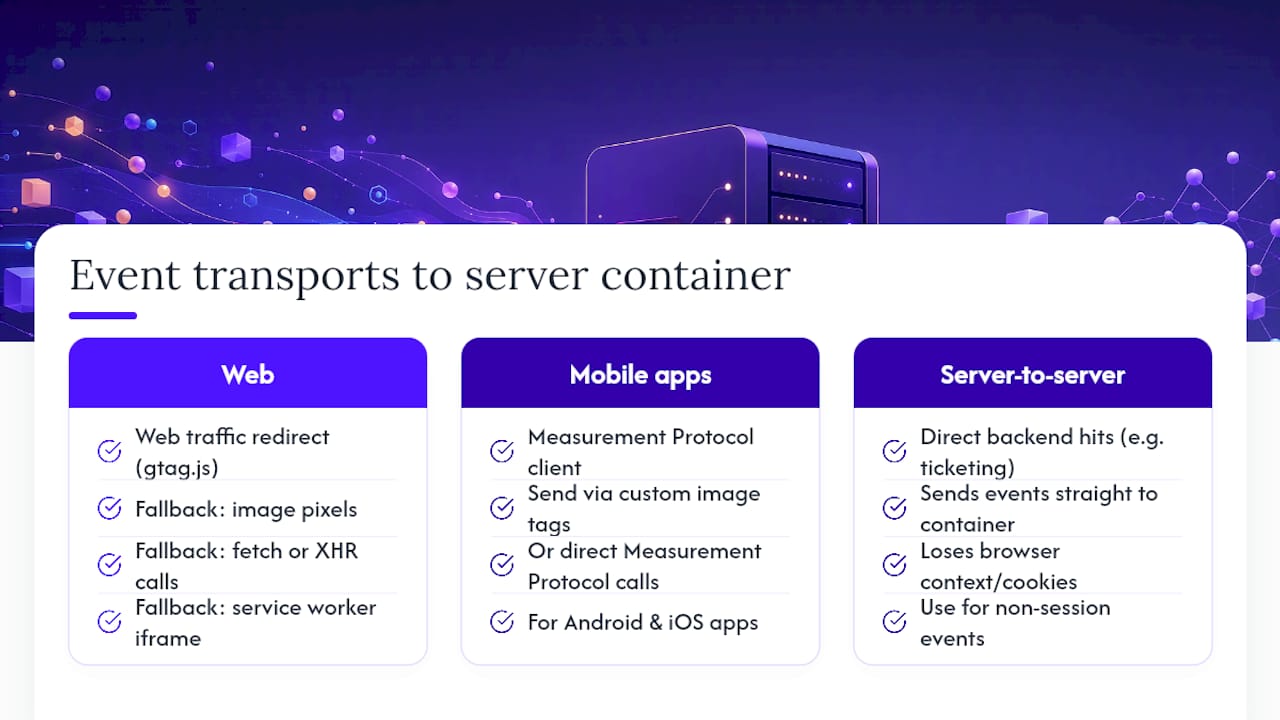
Mobile apps and other non-browser sources need a different route. Configure a Measurement Protocol client in your server container, then send hits from Android or iOS using custom image tags or direct Measurement Protocol calls. Pure server-to-server delivery, useful for backend systems like a ticketing platform pushing purchase events directly, works the same way but loses browser context like cookies, so reserve it for events that don’t depend on session continuity.
Planning for Deployment, Scale, and Cost
Cloud Run’s automatic provisioning is the right call for testing and small deployments, but it wasn’t built to be your only production safeguard at meaningful volume. Manual clusters give you more control, provided every instance shares identical CONTAINER_CONFIG and PREVIEW_SERVER_URL values, so behavior stays consistent as you scale out.
Autoscaling handles traffic spikes automatically, but keep a minimum instance count above zero so you’re not eating cold-start latency on every new burst.
Redundancy matters more here than on a typical web app. A dropped server container means dropped analytics and ad conversions, not just a slow page.
Cost drivers are instance count, allocated CPU and RAM, and network egress. Small setups typically land in the $30 to $50 per server monthly range once you’re past free-tier limits, with costs climbing alongside traffic.
Pro Tip: Budget for monitoring tools alongside the server cost itself. An outage you don’t notice for three days costs more in lost data than the infrastructure ever will.
How Do You Preview and Debug Server-Side Tags?
Nothing goes to production until it passes through a preview server first, since preview mode requires its own HTTPS-accessible instance with specific load balancer timeout settings. Use it to catch problems before real traffic hits your container.
Open Tag Manager Preview mode against your preview server and fire a test event from your site.
Check which client claims the request. If no client claims it, or the wrong one does, your event never reaches the right tag.
Confirm the parsed event has every parameter your downstream tag expects. Missing fields are the most common silent failure.
Verify cookies are being set as first-party if you’re using a custom subdomain. If they’re not, your subdomain mapping likely isn’t complete.
Watch for duplicate firing between client-side and server-side tags during dual-tagging, and adjust trigger activation criteria until each event fires exactly once.
What Should Cultural Organizations Prioritize First?
Museums and theaters don’t need to move every tracking pixel server-side on day one. Start with your highest-value flow: ticketing conversion events. That’s a contained, well-defined dataset, and it’s the one number your leadership actually asks about.
Prioritize mapping a custom subdomain early, since durable first-party cookies matter most for cross-session attribution, the exact problem that makes it hard to credit a Meta campaign for a ticket purchased three days later on a different device.
Once server-side ticketing events are flowing reliably, they become far more useful feeding into a live attribution dashboard than sitting isolated in a single ad platform’s reporting. That’s the model Opti Arts builds around for cultural organizations: clean, first-party event data flowing into one place where box-office performance and ad spend sit side by side, not scattered across five vendor dashboards that never agree with each other.
Where to Go Deeper on Server-Side Tagging
Start with Google’s introduction to server-side tagging for architecture, then the manual setup guide for provisioning. For consent and data handling, IAPP is worth bookmarking. For deeper reading on measurement and cross-channel attribution, Blog covers related integration work.
Bring Server-Side Data Into Your Campaign Dashboard
Getting the pipeline built is only half the job. The other half is doing something useful with cleaner, more complete event data once it exists. That’s where a lot of teams stall: they build the server container, verify parity, and then keep looking at the same fragmented reports they had before.
Opti Arts folds server-side event data directly into Breakeven, the dashboard built specifically for tracking ticket sales and campaign performance side by side. Instead of pulling GA4 numbers into one tab and ad spend into another, you see attribution the way it actually happened, informed by the first-party data your new server container is now collecting.
If you’re weighing whether to build this in house or bring in a partner who’s done it for cultural organizations specifically, Opti Arts’ analytics and advertising solutions are built around exactly this handoff, from server-side setup through campaign attribution.
Where the Conventional Advice Gets This Wrong
Most guides treat server-side tagging as a technical upgrade you flip on once and forget. That’s backwards. The real value shows up in the discipline of dual-tagging and parity checking, not in the migration itself. Skip that step and you’ve traded one set of unreliable numbers for a different, equally unreliable set, just with more infrastructure to maintain.
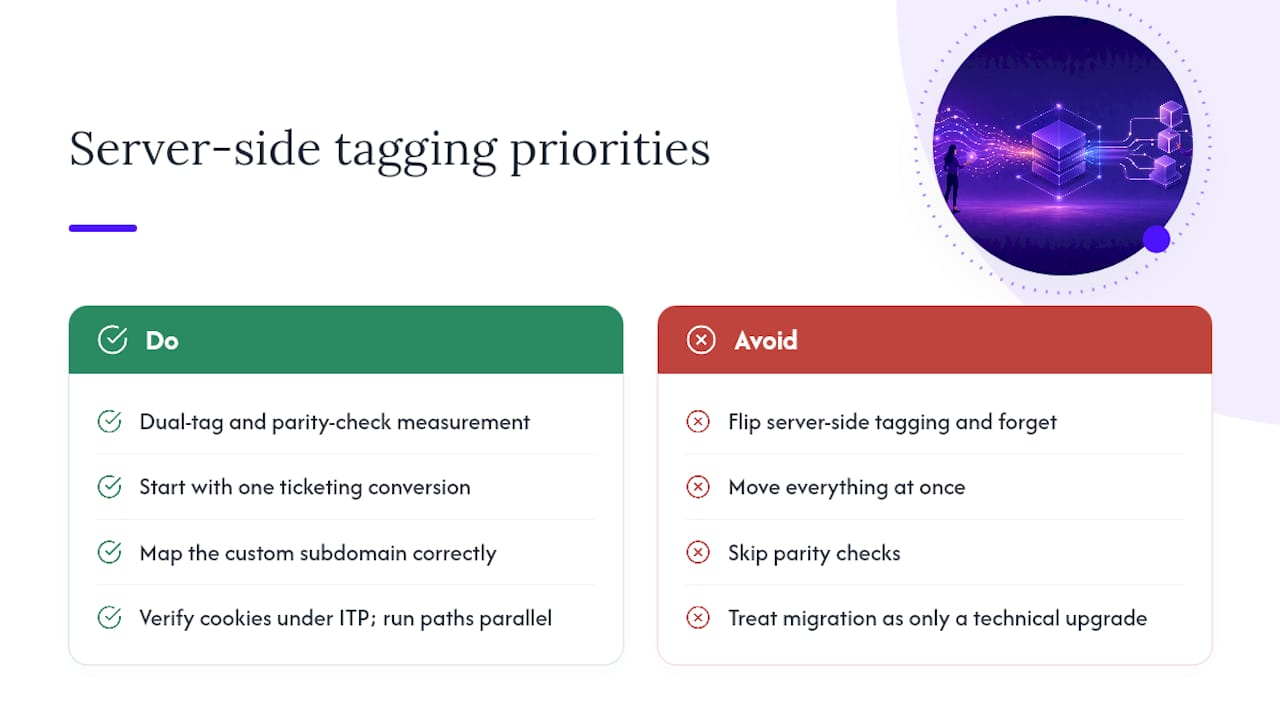
The other overrated idea is that you need to move everything at once. You don’t. A single ticketing conversion event, measured well, tells a cultural organization more than a half-finished migration of ten event types where nobody’s sure which numbers to trust.
What actually deserves priority is the boring part: mapping the custom subdomain correctly, verifying cookie behavior under ITP, and running both measurement paths in parallel long enough to trust the difference between them. Skip the boring part and the fast part won’t matter. Get it right, and server-side tagging stops being a compliance chore and starts being the reason your attribution finally makes sense.
— Trevor
Recommended