

8 Step GTM Consent Mode for Nonprofits to Protect Ad Grant Conversions


If your nonprofit runs Google Ads, uses Ad Grants, or tracks conversions in GA4, you need Consent Mode v2. The single next action is enabling conservative default consent inside Google Tag Manager through a Consent Initialization trigger, then confirming your consent management platform passes real-time updates to Google’s tags. This CMP plus GTM pairing is the standard path for cultural and charitable organizations, and it’s the foundation everything else in this guide builds on.
TL;DR:
Nonprofits serving EU, UK, or regulated regions with paid campaigns or Ad Grants must implement Consent Mode v2 in advanced mode to preserve conversion data and ensure compliance.
Proper setup requires enabling the Consent Initialization trigger in GTM, mapping consent categories correctly, firing update calls on consent changes, and configuring individual tags’ consent requirements.
Choosing the right CMP depends on your technical capacity and needs: Complianz and Cookiebot suit WordPress sites; CookieYes and OneTrust suit budgets and compliance; Klaro fits engineering-led custom stacks.
Privacy-first analytics like Plausible can replace consent banners for organic traffic analysis but don’t support detailed ad attribution for paid campaigns.
Server-side tagging can reduce data loss from consent issues but involves extra infrastructure costs, which may not be justified for organizations with smaller ad spends.
Table of Contents
What Is Consent Mode V2 and Why Does It Matter for Nonprofits?
Consent Mode v2 is Google’s framework for adjusting how tags behave based on a visitor’s cookie choices. It reads four consent signals: analytics_storage (controls Google Analytics cookies), ad_storage (controls advertising cookies), and two parameters added in v2, ad_user_data and ad_personalization, which govern whether data can be used for Google’s ad products and personalized targeting. A nonprofit running Meta or Google campaigns alongside Ad Grants needs all four mapped correctly, not just the original two.
There are two operating modes, and the difference determines how much data you keep.
Basic mode blocks Google tags entirely until a visitor grants consent. No cookies fire, but no data reaches Google either, which means every “no thanks” click becomes a total measurement blind spot.
Advanced mode lets tags fire in a cookieless state before consent, sending anonymized signals (called pings) that Google uses to statistically model conversions it can’t observe directly.
For most nonprofits, Advanced mode is the better default. It typically recovers a meaningful share of conversions that Basic mode simply throws away, which matters enormously if your Ad Grant performance or Smart Bidding strategy depends on volume. Nonprofit-focused guidance confirms that Advanced mode preserves modeled conversions critical to Ad Grant reporting, while Basic mode leaves you reporting on a fraction of real activity.
Regulators haven’t mandated one mode over the other, but the practical reality is that organizations serving EU, UK, or other regulated-region traffic without any consent signal at all now risk having their Google Ads accounts flagged or restricted. Consent Mode isn’t optional paperwork. It’s the mechanism that keeps your ad account compliant while keeping your reporting usable.
Does Your Nonprofit Actually Need Consent Mode?
Not every organization needs the full Advanced setup on day one. Run through this checklist honestly before deciding how deep to go.
Do you have Google Ads, Google Analytics, or Google Tag Manager installed on your site?
Does any meaningful share of your traffic come from the EU, UK, or other regions with active cookie consent laws?
Are you running Google Ad Grants or paid Google campaigns that depend on conversion data?
Does your bidding strategy rely on Smart Bidding, which needs conversion signals to optimize?
If you answered yes to two or more of these, Consent Mode v2 in Advanced mode is not a nice-to-have. Nonprofits with active Ad Grant accounts serving regulated regions should treat this as required infrastructure, since Ad Grant performance depends directly on accurate conversion measurement and Google increasingly expects consent signals from advertisers targeting those regions.
If your traffic is overwhelmingly domestic, you don’t run paid campaigns, and your reporting needs are limited to “how many people visited our events page,” you have more room to breathe. A privacy-first analytics tool, covered further down, might serve you better than the full Consent Mode buildout. The honest answer for most mid-sized cultural nonprofits, though, is that they’re running at least some paid media and some EU or UK traffic, which puts them squarely in Advanced mode territory.
How to Set Up Consent Mode V2 in Google Tag Manager
This is the sequence a site admin or developer should follow. Skipping steps, especially the first one, is how organizations end up leaking data before consent is captured.
Enable the Consent Initialization trigger in GTM. This trigger fires before any other tag, setting your default consent state. A regular Page View trigger fires too late and risks leaking data before defaults apply, which is one of the most common Consent Mode misconfigurations teams make.
Set conservative default values. For visitors in regulated regions, default ad_storage, analytics_storage, ad_user_data, and ad_personalization to “denied” until your CMP says otherwise. Google’s own developer documentation provides the setDefaultConsentState syntax and recommends region-specific defaults rather than a single global setting.
Map your CMP’s consent categories to the four v2 parameters. Your cookie banner’s “Marketing” toggle needs to map to ad_storage and ad_user_data, while “Analytics” maps to analytics_storage. Get this mapping wrong and your banner will show granted consent while Google still treats the visitor as denied.
Fire update calls when consent changes. Every time a visitor interacts with your banner, your CMP should trigger an updateConsentState call that pushes the new values to GTM. This is the “update” half of Google’s two-step default-then-update flow.
Enable ads_data_redaction and url_passthrough where appropriate. Setting ads_data_redaction to true strips ad click identifiers when ad_storage is denied. Enabling url_passthrough preserves gclid parameters across pages so conversion modeling can still connect an ad click to a donation or ticket purchase without relying on cookies.
Configure Consent Settings on each individual Google tag. GA4 configuration tags and Google Ads conversion tags each need their own consent requirements set, not just the container-level defaults.
Turn on GA4 behavioral modeling. In your GA4 property settings, enable the reporting identity and modeling options. Without this, Advanced Consent Mode’s cookieless pings won’t show up in your reports even if the tags are firing correctly.
Persist consent state across page loads. If your CMP loads asynchronously or after GTM initializes, re-push consent events on each page so returning visitors aren’t treated as fresh, undecided users on every visit.
Pro Tip: Test your Consent Initialization trigger by loading your site in an incognito window with your browser’s network tab open. If you see any Google tag firing a full request before your cookie banner even renders, your trigger order is wrong. Fix that before touching anything else.
Which Consent Management Platform Fits a Nonprofit Site?
The CMP you choose determines how much engineering time this project eats up, and nonprofit teams rarely have engineering time to spare. Five platforms dominate the practical conversation for organizations at this scale: Cookiebot, CookieYes, Complianz, OneTrust, and Klaro.
Complianz works well for WordPress-native nonprofits that want consent banners and basic Consent Mode wiring handled through a plugin rather than custom code.
Cookiebot offers deeper native GTM integration, which suits organizations that already have someone comfortable inside Tag Manager and want more granular control over update calls.
CookieYes tends to fit budget-conscious sites that need solid v2 compliance without the price tag of enterprise tools.
OneTrust is built for organizations with formal audit and governance requirements, think larger cultural institutions with boards that want documented consent logs.
Klaro is open-source and suits engineering-led teams running a custom stack outside WordPress, where flexibility matters more than convenience.
GTM template availability and IAB TCF support vary between these platforms, so confirm both before committing. Also check whether the CMP logs consent decisions in a way your board or auditors can review later. Plugin-based tools like Complianz minimize technical lift but offer less granular control. Hosted platforms like OneTrust cost more but hand you audit trails out of the box. Open-source options like Klaro cost nothing in licensing fees but shift the wiring work onto whoever manages your codebase.
When Should You Use Privacy-First Analytics Instead?
Privacy-first analytics tools sidestep the entire consent problem in a specific case: they don’t use cookies or assign persistent visitor identifiers, so most regulations don’t require a consent banner for them at all. Plausible is the clearest example, tracking aggregate traffic patterns without building individual visitor profiles across sessions.
This is a real trade-off, not a free upgrade. You get simpler governance and no banner friction, but you lose the granular, ad-platform-linked conversion data that Consent Mode’s modeling is built to preserve. If your nonprofit runs paid Meta or Google campaigns and needs to attribute a donation back to a specific ad, privacy-first analytics won’t give you that connection.
Choose it if your traffic is largely organic and you’re not running paid acquisition campaigns.
Skip it if Ad Grants, Smart Bidding, or campaign-level ROI reporting matter to your team.
Consider running both: Plausible for baseline site health, Consent Mode v2 for anything tied to paid media.
Pro Tip: Small nonprofits with one part-time marketer often find that swapping to privacy-first analytics for internal reporting, while keeping Consent Mode wired for the ads account, cuts their governance workload without sacrificing ad performance data.
Can Server-Side Tracking Reduce Data Loss From Consent Mode?
Server-side tagging routes tracking data through a server you control before it reaches Google, rather than sending it directly from the visitor’s browser. This setup can strip IP addresses and other identifying details before forwarding aggregated events, which improves privacy posture while keeping conversion signals usable for modeling. It also sidesteps some of the tracking losses caused by ad blockers and browser-level cookie restrictions that hit client-side tags directly.
Paired with Advanced Consent Mode, server-side tagging can meaningfully reduce the modeling gap that Basic mode or misconfigured Advanced setups leave behind. The two approaches complement each other: Consent Mode governs what’s legally allowed to be collected, and server-side tagging governs how cleanly that data gets from your site to Google without leaking through third-party scripts along the way.
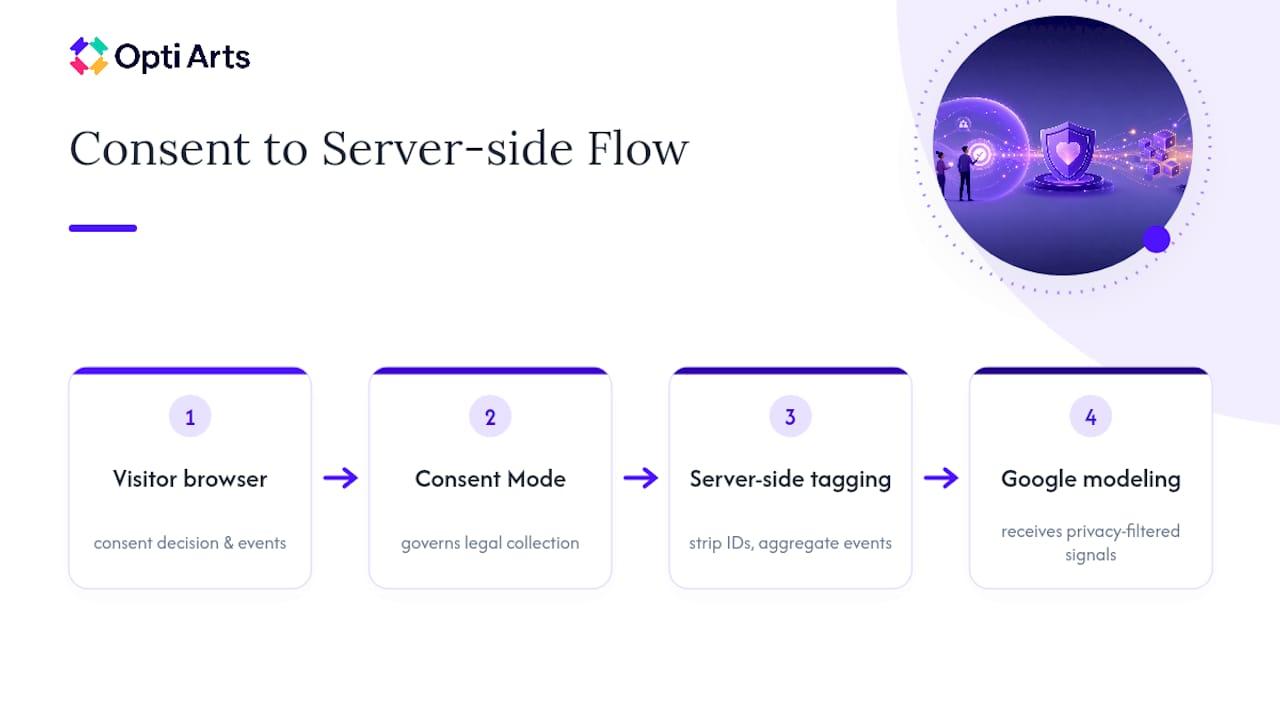
The catch is cost. Server-side tagging requires hosting infrastructure, ongoing engineering maintenance, and a privacy review to confirm the server-side container itself isn’t creating new compliance problems. For a nonprofit running a five-figure annual ad budget through Ad Grants, that investment rarely pencils out. For a larger cultural institution running six or seven figures in paid media across multiple platforms, the modeling recovery can justify the engineering cost. Know your ad spend before you commit to this tier.
How Do You Verify Consent Mode Is Actually Working?
Wiring Consent Mode correctly and confirming it works are two different jobs. Skip the second one and you may be running a broken setup for months without knowing it.
Open GTM Preview mode and Tag Assistant. Load your site before interacting with the cookie banner and confirm that tags requiring consent show as blocked or firing in a limited, cookieless state.
Accept and decline consent, then reload Preview mode. Confirm your update calls actually change each tag’s status in real time rather than requiring a page refresh.
Check the browser’s network tab. Look for any request to Google Analytics or Google Ads domains firing before your CMP loads. If you see one, your Consent Initialization trigger isn’t running early enough.
Inspect cookies and localStorage directly. Confirm no _ga or _gcl cookies are set when consent is denied, and that they appear correctly once consent is granted.
Check GA4 and Google Ads diagnostics for modeled conversions. Google’s own guidance recommends confirming that modeled conversions appear in your reporting once traffic volume is sufficient, typically after enabling behavioral modeling in GA4 property settings.
Document every step for your board or funders. A written verification log, dated and saved, gives you something concrete to point to if a funder or auditor asks how your organization handles visitor consent.
Testing tools built for diagnosing tag behavior, including resources for checking how traffic sources are captured in GA4, can help confirm your setup is reading signals correctly rather than silently failing. Treat this checklist as a recurring quarterly task, not a one-time launch step. CMP updates, GTM container changes, and new campaign tags all create fresh opportunities for something to break quietly.
What Nonprofit Teams Get Wrong About Consent Mode Trade-offs
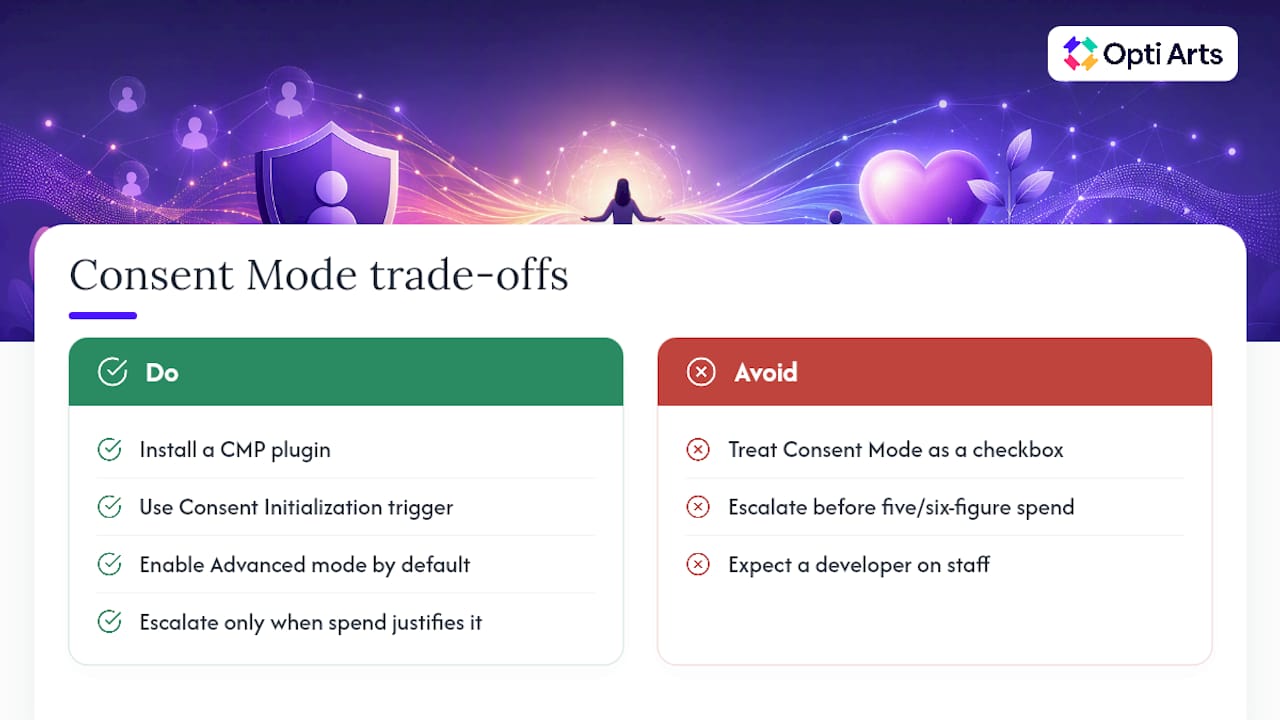
Most nonprofit teams treat Consent Mode as a compliance checkbox rather than a measurement strategy, and that framing costs them conversions they don’t realize they’re losing. The organizations that get this right start small: a CMP plugin, a properly ordered Consent Initialization trigger, and Advanced mode turned on by default. That combination covers the vast majority of resource-constrained teams without requiring a developer on staff.
Escalate to server-side tagging or outside technical help only once your ad spend or Ad Grant volume justifies the engineering cost, not before. Cultural organizations we’ve worked with tend to hit that threshold when paid media crosses into meaningful five or six-figure territory, where even small modeling gaps translate into real dollars misattributed or missed entirely.
— Trevor
Get Your Consent Mode Setup Handled by Opti Arts
Opti Arts offers services to build and validate Consent Mode v2 wiring, integrating analytics work for cultural organizations running paid campaigns across Meta, Google, YouTube, and Streaming TV.

Rather than leaving your Ad Grant conversions to chance, a technical audit can check your Consent Initialization trigger order, CMP-to-GTM parameter mapping, and GA4 behavioral modeling settings, then provide a documented checklist for review. Such engagements often include validated Consent Mode v2 wiring, corrected GTM setup, properly configured CMP integration, and a plan for recovering conversions lost to consent gaps. If your organization runs paid media and needs someone who already understands cultural sector analytics, visit Opti Arts’ solutions page to start a technical audit.
Where to Verify These Consent Mode Details Yourself
Google’s own Tag Platform documentation is the primary reference for setDefaultConsentState and updateConsentState syntax, including regional default recommendations. For a full walkthrough of GTM trigger order, update calls, and debugging, the Consent Mode HQ setup guide covers the practical sequence in detail. CMP vendors publish their own integration notes for GTM templates and TCF support, and Sourcepoint’s overview of Consent Mode 2.0 explains the basic-versus-advanced distinction clearly. For the privacy-first analytics comparison, Plausible’s own explanation of its cookieless approach is worth reading directly.
Sources
FAQ
What Is Consent Mode?
Consent Mode is Google’s system for adjusting how tags like Google Analytics and Google Ads behave based on a visitor’s cookie consent choice. Instead of an all-or-nothing block, it lets tags send limited, anonymized signals even when a visitor declines cookies, which Google’s documentation uses to model the conversions it can’t directly observe.
How Do I Check That Consent Mode Is Working Correctly?
Use GTM Preview mode and Tag Assistant to confirm tags are blocked or limited before a visitor consents, and that they update immediately after a consent decision. Follow up by checking the browser’s network tab for any tracking request firing before your banner loads, and confirm modeled conversions appear in your GA4 and Google Ads diagnostics once enough traffic accumulates.
What Does a Compliant Cookie Consent Message Look Like?
A compliant message clearly states what data is collected, offers separate accept and decline options rather than one dismiss button, and lets visitors change their choice later. The banner’s category toggles, such as “Analytics” or “Marketing,” need to map directly to Consent Mode’s four parameters so a decline actually changes what your tags do rather than just closing the popup.
What Is Google Consent Mode V2?
Consent Mode v2 is the current version of Google’s consent framework, adding two parameters, ad_user_data and ad_personalization, on top of the original ad_storage and analytics_storage signals. Nonprofit guidance confirms it’s required for Google advertising products serving EU, EEA, or UK traffic, and Advanced mode is the recommended setting for organizations running Ad Grants or paid campaigns.
Does a Small Nonprofit With No Paid Ads Still Need Consent Mode?
If you don’t run Google Ads and don’t rely on GA4 conversion data, you have more flexibility, and a privacy-first analytics tool like Plausible may cover your needs without any consent banner at all. Once you introduce paid campaigns or Ad Grants, Consent Mode v2 becomes the more reliable path for accurate measurement.
Recommended