

3 Frequency Cap Types That Protect ROI for Cultural Marketers


Frequency capping is the practice of limiting how many times a single person sees your ad within a set window, and the rule that governs it is simple: set your cap by campaign objective and audience temperature, then start conservative and adjust based on real fatigue signals. Google Ads builds this into its frequency management settings, and agencies like Opti Arts apply the same logic when pacing ticket campaigns for museums and theaters, where audience pools are small and every wasted impression is a missed seat.
TL;DR:
Set your frequency caps based on campaign objective and audience warmth, with a focus on daily and recency limits to prevent burst overexposure.
Use impression caps for awareness, view caps for attention-sensitive formats like video and CTV, and recency caps to avoid clustering impressions within short windows.
For small or segmented audiences, reduce caps further or expand targeting to avoid quick exhaustion of reach, especially when retargeting high-interest groups.
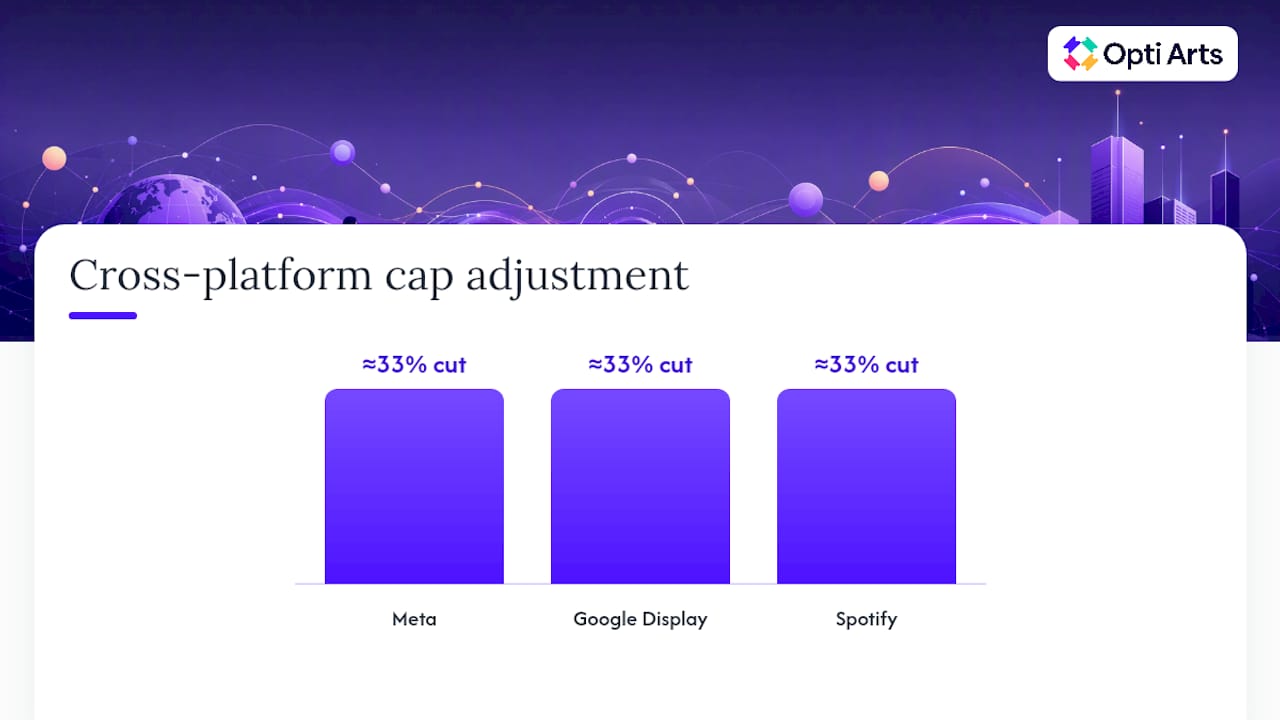
Coordinate caps across multiple platforms by assuming some audience overlap and lowering individual platform limits by roughly a third to prevent unintentional overexposure.
Measure frequency distribution and cohort performance regularly to identify the inflection point where decreasing ROI indicates overexposure, and adjust caps accordingly.
Table of Contents
What Is Frequency Capping and How Do Platforms Count It?
Ad platforms track exposure through a mix of device IDs, browser cookies, and logged-in user identifiers, then stop serving once a person hits the cap you set. That tracking has real limits. A viewer who sees your ad on a phone, then a laptop, then a connected TV, often registers as three separate people unless the platform has strong identity resolution. This is why cross-device frequency is always an estimate, not an exact count.
Three cap types dominate the category, and understanding the difference matters more than picking a number. Amazon Advertising separates them clearly:
Impression caps limit how many times an ad is served, regardless of whether the viewer noticed it.
View caps count only exposures that met a viewability threshold, usually 50% of the ad in view for at least one second (display) or two seconds (video).
Recency caps control the minimum gap between impressions, so a user doesn’t see the same creative three times in ten minutes.
Most platforms also apply caps in a hierarchy: creative level first, then line item, then campaign, then sometimes the advertiser account as a whole. A cap set at the line-item level won’t stop a different creative in the same campaign from also reaching that person, which is a common source of accidental overexposure. If you’re running multiple line items against overlapping audiences, check whether your campaign-level cap actually enforces a ceiling across all of them, or whether each line item is counting independently.
Why Does Frequency Capping Matter for ROI and Brand Perception?
Ad fatigue is measurable, and it shows up fast. Research on exposure-response patterns, including the classic work on repeated ad exposures, finds that most of an ad’s persuasive impact lands in the first two or three exposures. Beyond that point, additional views tend to produce diminishing returns, and past six to eight exposures, viewers often shift from indifference to irritation.
Statistic Callout: U.S. consumer data tracked by Statista shows that ad avoidance driven by overexposure is a documented, measurable behavior among American adults, not a fringe complaint. When people actively skip, mute, or block ads because they’ve seen them too often, that’s lost reach you already paid for.
Caps solve a budget problem as much as a brand problem. Every dollar spent on a ninth impression to someone who tuned out after the fourth is a dollar not spent reaching someone who hasn’t seen your message at all. Tight frequency management redistributes spend toward incremental reach, which is usually where the real return lives, a point echoed in Opti Arts’s own work on maximizing return on ad spend.
Watch for these fatigue indicators, and treat any two of them appearing together as a signal to act:
Click-through rate dropping steadily across successive frequency cohorts.
Cost per acquisition climbing even as spend holds flat.
Reach plateauing while impressions keep growing (a sign you’re re-serving the same people).
Negative feedback signals: ad hides, “see less” clicks, or comment sentiment turning sour.
What Cap Types and Windows Should You Configure?
Frequency has two independent levers: total count and spacing. Epom’s DSP guidance frames it exactly this way, and treating them as separate settings, rather than one blended number, is what separates a well-tuned campaign from a guessing game.
Impression vs. view caps vs. recency windows
Impression caps make sense for awareness campaigns where sheer exposure matters more than certainty of notice. View caps fit better once you care about attention quality, particularly for video and CTV, where an impression can register even if the viewer left the room. Recency caps solve a different problem entirely: the “why does this ad keep stalking me” experience that happens when a platform bursts several impressions into a short window. A minimum gap of 10 to 30 minutes between impressions typically prevents that clustering effect.
Why you need both daily and lifetime caps
A daily cap alone won’t stop a campaign from serving the max allowed every single day for weeks, which quietly rebuilds fatigue over the life of the campaign. A lifetime cap alone won’t stop a burst delivery pattern that shows someone your ad five times in one afternoon. Layer them: set the daily or 24-hour cap first as your pacing guardrail, then add a lifetime cap as the outer boundary for the full campaign window. This two-layer structure is standard DSP practice and gives you protection against both burst oversaturation and slow-drip exhaustion.
Viewability and format considerations
Video and CTV inventory should almost always run on view caps rather than impression caps, since served-but-unseen video impressions are common and shouldn’t count against your frequency budget. Display formats vary more; a small banner in a cluttered layout may need a stricter cap than a full-width takeover, simply because visual competition on the page reduces effective attention per impression.
Pro Tip: Set your daily or recency cap before you touch the lifetime number. If you configure the lifetime cap first, you have no floor stopping a burst delivery pattern from front-loading half that cap into the campaign’s first 48 hours.
Here’s a quick reference for how the three cap types typically get deployed:
Impression caps: broad awareness, brand lift, sponsorship-style buys.
View caps: video, CTV, any format where “served” doesn’t reliably mean “seen.”
Recency windows: any campaign where users have reported feeling followed, or where delivery logs show clustered timestamps.
How Do You Set the Right Cap by Objective and Audience?
Objective and audience temperature drive almost everything else in your frequency strategy, and getting this wrong is the single most common cause of wasted spend. Cold prospecting audiences tolerate far less repetition than someone who already added a ticket to their cart, a distinction Amazon’s frequency guidance treats as foundational to cap selection.
Practitioner benchmarking from theStacc’s frequency capping glossary offers a useful starting point, though every number here should be treated as a hypothesis to test, not a fixed rule:
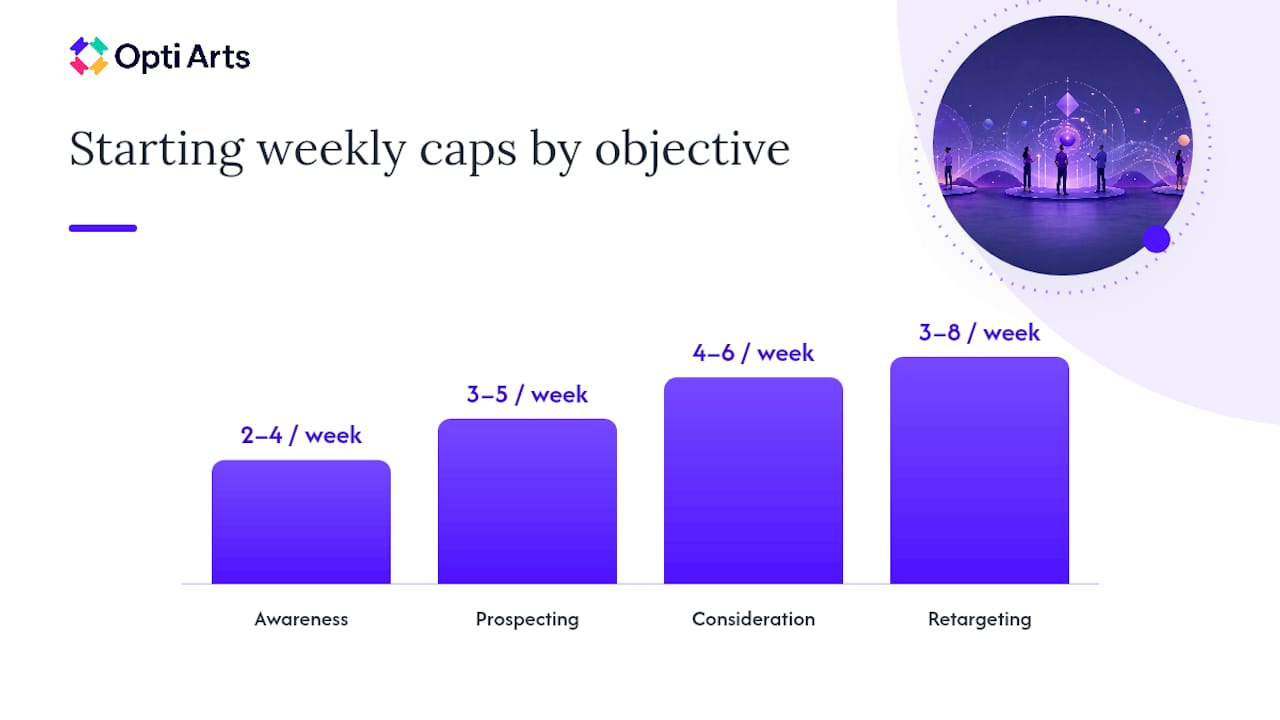
Objective | Audience temperature | Starting frequency range | Typical window |
Awareness | Cold, broad | 2 to 4 per week | Weekly cap |
Prospecting | Cold to lukewarm | 3 to 5 per week | Weekly |
Consideration | Warm | 4 to 6 per week | Weekly cap |
Retargeting | Hot | 3 to 8 per week | Weekly, with recency window |
Small audiences change the math entirely. If you’re retargeting a pool of 500 to 2,000 past visitors, even a modest weekly cap can exhaust unique reach in a matter of days, forcing the platform to either stall delivery or start burning through your budget on repeat views of the same handful of people. In that situation, you have three real options: expand the audience through lookalikes or broader targeting, lower the cap further, or accept slower daily delivery stretched across a longer window. Watch per-user impression distribution, not just the average frequency number, since averages hide the fact that your most engaged 10% might already be seeing the ad fifteen times while everyone else sees it twice.
The decision between raising a cap and refreshing creative comes down to what your cohort data shows. If click-through rate drops but conversion rate on the people who do click stays steady, that’s often a creative fatigue signal, and rotating the asset usually outperforms simply allowing more impressions. If reach has plateaued and spend is going unused, that’s a delivery constraint, and raising the cap or widening the audience solves it.
What Are the Frequency Starting Points by Channel?
General caps only get you so far; each channel has its own delivery mechanics and its own tolerance for repetition.
Display: Start around 3 to 5 impressions per week per line item, and lean on view-through caps if viewability rates on your inventory run low.
Video (in-stream, social video): Cap around 3 to 4 completed or near-completed views per week; video fatigue tends to hit faster than static display because the format demands more attention per exposure.
CTV/OTT: Counting happens at the household level, not the individual, since most CTV environments can’t distinguish who in the living room is watching. Keep caps modest (2 to 3 per week per household) and rotate creative more aggressively, since the whole household is absorbing every repeat. Opti Arts’s guide to CTV and OTT advertising covers the household-counting quirk in more depth.
Social feeds: Fast-scroll consumption means people can rack up impressions quickly without registering the ad consciously. Weekly caps in the 4 to 6 range are common, but recency windows matter more here than almost anywhere else.
Audio (streaming, podcast): Frequency tolerance is lower because there’s no visual skip option; 2 to 3 per week per listener is a safer starting range.
Push notifications: Treat this channel differently entirely. Push has an opt-out cost (a full unsubscribe) that display and social don’t carry the same way, so 1 to 2 per week is typical outside of time-sensitive event reminders.
Creative rotation cadence should track channel speed. Fast-consumption formats like social and push need new creative every 3 to 5 exposures to reset fatigue, an operational rule that theStacc’s guidance backs up and one that some agencies apply when pacing show announcements against a fixed on-sale date.
How Do You Manage Frequency Across Multiple Platforms?
No single dashboard sees everything. Someone can hit your daily cap on Meta, then walk straight into a fresh cap pool on Google Display, then get served again on a streaming audio platform, and each system thinks it’s the first exposure of the day. This is the identity fragmentation problem, and it’s the reason most advertisers overexpose audiences without realizing it.
Identity graphs and unified ID solutions such as LiveRamp exist to solve this by matching a person’s footprint across platforms into one profile. They help, but coverage is never complete, especially on privacy-forward browsers or CTV environments with limited login signals, a limitation theStacc’s cross-platform guidance calls out directly.
Where identity coordination is imperfect, the practical fallback is conservative math. Set each platform’s cap lower than you would if it were the only channel in play, and assume some overlap between platforms rather than treating each one as reaching a fully distinct population. If you’re running Meta, Google, and Spotify simultaneously against the same retargeting list, cutting each platform’s individual cap by roughly a third is a reasonable starting adjustment while you build cleaner cross-channel reporting. Opti Arts’s breakdown of programmatic advertising trade-offs walks through similar overlap assumptions for multi-platform buys.
It’s a rough estimate, but it’s far closer to reality than assuming zero overlap, which is what most default platform reporting implies.*
What Should You Measure to Tune Your Caps?
Guessing at the right frequency number wastes budget in both directions, too low and you’re capping reach you could still capture, too high and you’re paying for irritation. A structured measurement routine fixes this.
Track frequency distribution, not just average frequency. The average hides outliers; a distribution chart shows you exactly how many people are seeing the ad 10+ times while others see it once.
Build frequency cohorts. Segment your reporting by exposure bucket (1 to 2, 3 to 5, 6 to 8, 9-plus) and compare CTR, CPA, and ROAS across those buckets. Opti Arts’s walkthrough on decoding programmatic ROI is a useful reference for interpreting this kind of cohort breakdown.
Find the inflection point. The frequency bucket where CPA starts climbing or CTR starts falling is your practical ceiling. Set your cap just below it, not at it.
Set monitoring cadence. Weekly review is the minimum for active campaigns; daily checks make sense during high-stakes windows like on-sale week for a limited-run event.
Add automated guardrails where the platform allows it, such as auto-pausing a line item once its frequency cohort curve crosses your CPA threshold.
How Do You Set Up Frequency Caps in Your Campaigns?
A safe rollout follows a specific order, and skipping steps is the most common way teams end up with either wasted spend or exhausted audiences.
Set the daily or recency cap first. This is your burst-delivery guardrail, and Google Ads lets you configure this per-day, per-week, or per-month window directly in campaign settings under frequency management.
Layer a lifetime or campaign-length cap on top. This becomes your outer boundary for the full flight.
Add a recency window if your platform supports it, especially for retargeting pools where clustered delivery is common.
Apply creative-level caps separately from campaign-level caps if you’re running multiple creative variants, so no single asset overexposes even if the campaign total looks healthy.
Exclude converters immediately. Anyone who already bought a ticket or completed the target action should drop out of the active frequency pool the moment they convert.
For small audiences, check pacing daily during the first week of any new campaign. If delivery stalls because you’ve hit unique-reach exhaustion, widen the audience before you raise the cap.
Google Ads: frequency settings live under campaign-level “Frequency management.”
Meta Ads Manager: frequency caps are set within the ad set under “Optimization & Delivery.”
DSPs generally expose both frequency and recency as separate fields, following the dual-lever structure Epom describes.
How Does Opti Arts Apply Frequency Capping for Cultural Organizations
Ticket-based campaigns run on a clock that most advertisers don’t deal with: a fixed curtain-up date. Opti Arts builds frequency caps around that calendar rather than a generic weekly number, tightening exposure early in an on-sale window when the audience pool is still cold and loosening it as the date approaches and retargeting pools warm up with cart abandoners and past ticket buyers.
Because museum and theater retargeting audiences are almost always small, sometimes just the list of newsletter subscribers or single-night engagement page visitors, some agencies treat per-user impression distribution as a daily check, not a monthly one. Creative rotation follows the same event-driven logic: a season trailer runs at a lower frequency early, then a single-night engagement gets a sharper, more urgent creative variant as the date closes in, swapped out roughly every 3 to 5 exposures to avoid the exact fatigue pattern this guide describes.
Reporting ties directly into Breakeven, the ticketing-linked dashboard Opti Arts uses to connect frequency cohorts to actual ticket sales rather than just click data, which is the only way to know whether a cap change actually moved revenue.
What Actually Matters When You Scale Frequency Capping
Most teams treat frequency capping as a single number they set once and forget. That’s backwards. The real work is in audience segmentation and cross-platform coordination, because a perfectly tuned cap on one platform means nothing if three other channels are quietly reaching the same person. Get the segmentation right first: separate cold prospecting from warm retargeting from post-purchase suppression, and only then start tuning numbers.
Creative refresh and measurement review need to become calendar habits, not reactive fixes you remember only after CPA has already climbed. Build the weekly cohort check into your existing reporting rhythm the same way you’d check spend pacing.
If you only take one tactical rule from this guide: set your daily or recency cap before your lifetime cap, and never trust an average frequency number without looking at the distribution behind it.
— Trevor
Get Coordinated Frequency Management With Opti Arts
Running frequency caps correctly across Meta, Google, YouTube, Spotify, and streaming TV at once is a coordination problem most in-house teams don’t have the bandwidth to solve manually, especially with the small, fast-moving audience pools that cultural organizations work with. Some services offer managed cross-platform campaigns paced to event calendars, with caps tuned for prospecting versus retargeting audiences instead of one blanket number applied everywhere.

What makes this approach different is the reporting layer underneath it. Breakeven ties frequency cohorts directly to ticket sales, so you can see whether a cap change actually moved attendance, not just clicks. Combined with creative rotation cadences built around on-sale dates rather than generic weekly schedules, it’s a setup designed for the pacing realities of single-night engagements and limited runs.
If your team is managing frequency manually across five or six platforms and losing track of overlap, take a look at the Opti Arts solutions page to see how a managed, coordinated setup handles it instead.
Sources
The platform and research sources behind this guide include Google Ads’ frequency management documentation, which covers native cap configuration for display and video campaigns, and Amazon Advertising’s frequency capping guide, which details cap types and viewability considerations. Practitioner benchmarks came from theStacc’s frequency capping glossary and Epom’s DSP-focused best practices, while the diminishing-returns research traces back to Krugman’s classic exposure study. Consumer ad-avoidance data comes from Statista.
Recommended