

$10,000 Google Ad Grants: Eligibility to Activation for Nonprofits


Google Ad Grants gives qualifying 501©(3) organizations up to $10,000 per month in free search ad credit. The main hurdle isn’t the money; it’s meeting Google’s eligibility rules and staying compliant once you’re in. If your nonprofit is in good standing, the next move is starting enrollment through Google for Nonprofits rather than debating whether it’s worth the effort.
TL;DR:
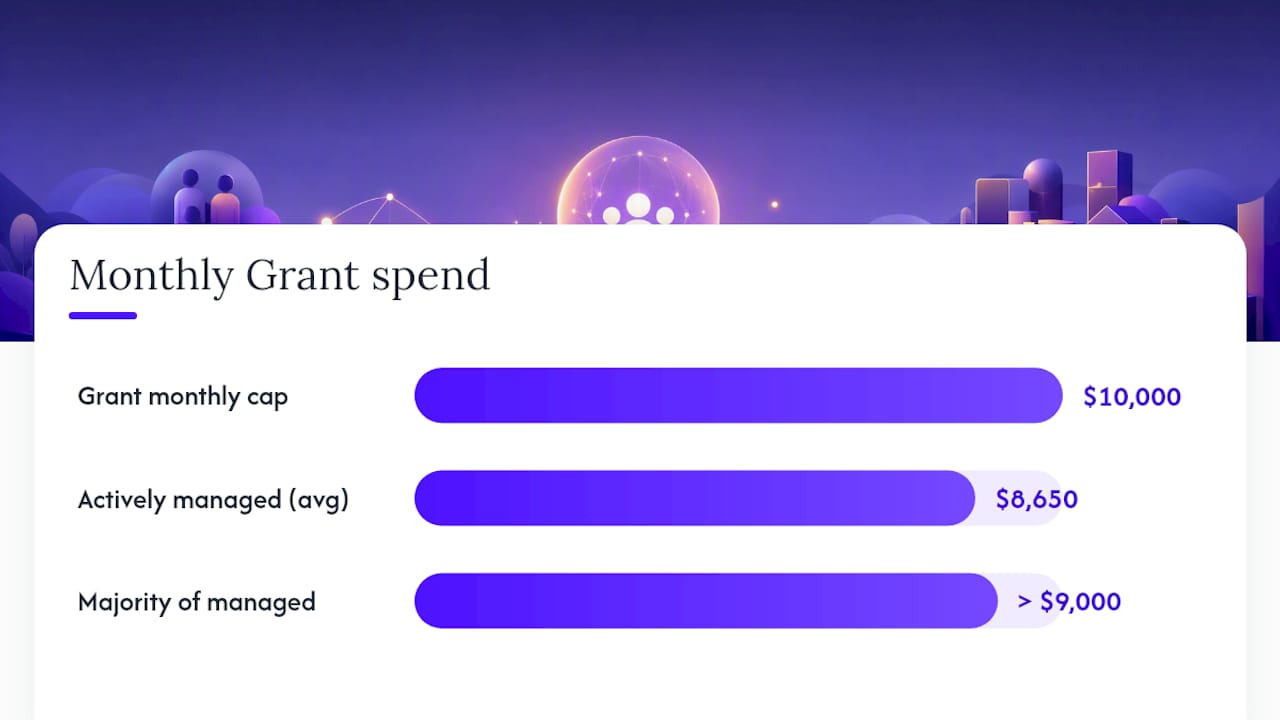
Active management significantly increases spend, with most nonprofits using around 8,650 to 9,000 of the $10,000 monthly credit.
Maintaining a minimum 5% click-through rate across the account is crucial; falling below this for two months risks suspension.
Campaign structure, including segmentation by event or goal and use of long-tail keywords, improves relevance and conversion rates.
Conversion tracking tied to donations, ticket sales, or signups is essential for measuring actual impact beyond clicks.
Eligibility requires current 501©(3) status, validation through TechSoup, and a functional website; nonprofits must also avoid broad, generic keywords and account neglect.
Table of Contents
What Is Google Ad Grants and How Does It Work?
Google Ad Grants is a program that gives eligible nonprofits up to $10,000 USD per month in donated search advertising, running as text ads on Google.com. Think of it as a marketing budget that appears automatically every month, as long as you keep the account healthy.
The credit only covers text-based Search ads. You can’t use it for display banners, YouTube video ads, or remarketing campaigns inside the Grant account itself, a restriction that trips up a lot of first-time applicants who assume the money works like a normal ad budget. Nonprofits typically point Grant traffic toward a handful of goals: raising awareness for a cause, driving one-time and recurring donations, recruiting volunteers, and promoting events, exhibitions, or performances.
One detail that surprises new grantees: the credit is in-kind and doesn’t roll over. Spend $6,000 in March, and you don’t get to carry the unused $4,000 into April. Google effectively resets the clock every month, which is part of why so many organizations leave money on the table. Treat it less like a bank account and more like a use-it-or-lose-it perk tied to how actively you manage the campaigns.
Who Is Eligible for the Google Ad Grants Program?
Eligibility comes down to organizational status first, verification second. In the United States, you need current 501©(3) status and enrollment in Google for Nonprofits before you can even apply for the ad credit.
Certain categories are excluded regardless of tax status. Government entities, hospitals and most healthcare organizations, and schools, academic institutions, and universities generally don’t qualify for Google Ad Grants directly. That said, fundraising arms or affiliated foundations tied to those institutions sometimes qualify separately, which matters for museums with a university affiliation or hospital systems with a distinct charitable foundation.
Verification runs through TechSoup (or an equivalent regional validator) and Google for Nonprofits itself. TechSoup checks your nonprofit documentation, and Google reviews your enrollment and website before Ad Grants activation.
Before you start the paperwork, run a quick self-audit:
Confirm your 501©(3) determination letter is current and matches your organization’s legal name.
Verify your website is live, functional, and clearly represents your mission (no “under construction” pages).
Check that your organization isn’t a school, hospital, or government entity without a qualifying separate fundraising arm.
Make sure someone on staff can commit a few hours monthly to account management, since an abandoned account gets suspended fast.
How to Apply for the Google Ad Grant Step by Step
The application sequence is more mechanical than mysterious, but skipping a step (or misordering them) is the top reason activations stall for weeks. Here’s the order that actually works:
Gather your documentation. Collect your 501©(3) determination letter, organization details, and website URL.
Get validated through TechSoup. Submit your nonprofit credentials and receive a validation token, which you’ll need for Google for Nonprofits enrollment.
Enroll in Google for Nonprofits. Create your account using the TechSoup token; this unlocks the broader suite of nonprofit products, not just Ad Grants.
Apply for Google Ad Grants specifically. Inside your Google for Nonprofits dashboard, request Ad Grants activation.
Submit your website for review. Google checks that your site has substantive content, secure browsing (HTTPS), and clear calls to action, not just a landing page.
Activate your account in Google Ads. Once approved, you’ll set up your first campaigns under Grant-specific policy constraints.
Before you launch anything, build a short activation checklist inside the new account: conversion tracking connected to a real goal (donations, signups, ticket purchases), at least two sitelink assets on your first ads, and a consistent campaign naming convention (by objective, then by geography) so the account stays legible as it grows. This sequencing mirrors the guidance nonprofit consultants at Candid recommend for organizations applying for the first time.
Timelines vary, but most organizations should expect several weeks between TechSoup validation and full Ad Grants activation, longer if your website needs revisions to pass Google’s content review. Build that lag into your planning if you’re timing a campaign to a season launch or fundraising deadline.
What Compliance Rules Cause Ad Grants Accounts to Get Suspended?
Staying enrolled is its own discipline, separate from getting approved in the first place. The rule that catches the most nonprofits off guard is the minimum 5% click-through rate requirement, calculated monthly across your account. Fall below that threshold for two consecutive months, and Google can suspend your Grant. In practice, this rule pushes you toward tightly targeted, mission-specific keywords instead of broad, generic terms that generate impressions nobody clicks.
Keyword policy compounds this. Single-word keywords are banned except on Google’s own approved exceptions list, and overly generic terms (like “donate” with no qualifier) tend to tank your CTR and your Quality Score simultaneously. Google also expects a functional, content-rich website behind every ad, since a thin or outdated site drags down relevance scores across the whole account.
A few account-hygiene habits meaningfully cut suspension risk:
Remove single-word and broad-match generic keywords proactively rather than waiting for a policy flag.
Aim for a keyword Quality Score of 3 or higher by matching ad copy and landing pages tightly to search intent.
Keep at least two sitelink assets active on every campaign.
Audit conversion tracking tags monthly. Broken tags are one of the quietest ways accounts drift out of compliance.
Complete Google’s annual program survey on time. Missing it is an avoidable, entirely administrative way to lose your grant.
Pro Tip: Set a recurring calendar reminder to check CTR and conversion tracking every two weeks, not just when a suspension notice lands in your inbox. By the time Google flags a problem, you’ve likely already lost a month of eligible spend.
If you do get suspended, most cases stem from CTR drops, unused conversion tracking, or a missed survey. All three are fixable within days once you know the cause, but reinstatement isn’t instant, so treat suspension prevention as cheaper than the fix.
How to Set Up and Optimize a Google Ad Grants Account
A Grant account that just sits there running default settings almost never uses the full $10,000. The nonprofits that get real value structure the account deliberately from day one.
Start with campaign architecture. Split campaigns by objective (donations, event promotion, volunteer recruitment) and, where relevant, by audience or geography. A single sprawling campaign covering “everything the org does” makes it nearly impossible to see which message is actually converting, and it makes the 5% CTR math harder to manage because weak and strong ad groups get averaged together.
Conversion tracking needs to point at outcomes leadership actually cares about: a completed donation, a ticket purchase, a newsletter signup, a volunteer application submitted. Set these up as goals in Google Analytics, then import them into Google Ads so spend and outcomes sit side by side. This is also where understanding paid media uplift alongside Analytics data pays off. Without that link, you’re reporting clicks to your board, not results.
For keyword strategy, long-tail, mission-specific phrases tend to outperform broad terms on both relevance and CTR. Pair them with a disciplined negative keyword list to filter out searches that waste impressions, and rotate ad copy variants regularly to see what resonates.
One tactic more nonprofits should use: running a separate, self-funded paid Ads account in parallel. Because Grant ads sit in their own auction tier, a paid account lets you access display, video, and remarketing formats without violating Grant restrictions or competing against your own Grant ads. This is where programmatic advertising strategies extend your reach past text search.
A realistic weekly and monthly KPI set looks like this:
Weekly: CTR by campaign, top and bottom performing keywords, budget pacing against the $10,000 cap.
Monthly: conversion volume by goal type, cost per conversion, Quality Score distribution, survey/compliance status.
Practitioner-reported data suggests actively managed Grant accounts average around $8,650 in monthly spend, with a majority exceeding $9,000, compared with unmanaged accounts that often spend a small fraction of the available credit.
What Results Should Nonprofits Realistically Expect?
Clicks are the least useful metric in this program. What matters is whether those clicks turn into donations, ticket purchases, or signups, and conversion tracking is the only way to know that. An account with a strong CTR but no conversion data tells you almost nothing about actual impact.
The gap between unmanaged and actively managed accounts is the clearest predictor of outcomes. Underused accounts are common: staff set up the Grant, get busy, and let it run on autopilot until a compliance email arrives. Active management, checking CTR, refreshing keywords, testing ad copy, closes most of that gap.
For attribution, look at assisted conversions alongside direct ones; Grant ads often introduce someone to your organization even when a donation happens weeks later through email or direct traffic. A simple monthly report to leadership should cover total spend against the $10,000 ceiling, conversions by goal, cost per conversion, and one qualitative note on what changed. Framing it around return on ad spend rather than raw click counts makes the report far more useful to a board.
Real Examples of Google Ad Grants Driving Nonprofit Results
Numbers convince skeptical board members faster than program descriptions do. The Van Gogh Museum’s Ad Grants ads contributed to 15% of its total ticket sales in a documented case, once the museum paired Grant campaigns with proper conversion tracking and campaign design tied to exhibition dates.
Two patterns show up repeatedly in cases like this:
Before: a small performing arts nonprofit runs one broad campaign targeting “theater tickets,” with no conversion tracking and a CTR hovering near 3%. After: campaigns split by show and by geography, ticket-purchase tracking installed, and mission-specific long-tail keywords. CTR clears 6%, and ticket-attributed conversions become visible for the first time.
Before: a museum treats Ad Grants as a set-and-forget awareness tool with no goal tracking. After: conversion tracking tied to timed-entry ticket purchases, sitelinks pointing to specific exhibitions, and monthly keyword pruning.
The lesson across both: the Grant rewards specificity. Vague campaigns waste the credit; campaigns tied to a single event, exhibition, or ticket type consistently outperform.
An Editorial Take: Why Cultural Organizations Underuse This Program
Museums and theaters have a structural advantage with Ad Grants that most never exploit: their audiences search with intent that’s easy to match. Someone searching “Van Gogh exhibit tickets near me” or “family-friendly theater shows this weekend” is already halfway to converting. Yet Optiarts sees cultural organizations treat their Ad Grants accounts the same way they treat a dusty donor database, set up once, revisited only when something breaks.
The real failure isn’t eligibility or even compliance. It’s campaign structure. A single “general awareness” campaign covering an entire season buries the strongest performing show behind the weakest one, and the 5% CTR math punishes that averaging every month. Cultural organizations that segment by exhibition, performance, or ticketing window consistently outperform, not because their content is better, but because their targeting matches how people actually search.
For a museum or theater, this program should function as a standing ticket-sales channel, not a side project. That takes account structure, conversion tracking tied to real ticket purchases, and the same optimization discipline you’d apply to a paid media budget, because functionally, that’s exactly what it is.
— Trevor
How Optiarts Can Manage Your Ad Grants Account
Optiarts is the alternative to running your Ad Grants account solo or letting it drift on autopilot: instead of a generic marketing checklist, you get campaign structure and conversion tracking built specifically around ticket sales, donations, and attendance, the outcomes cultural organizations actually get judged on.

Optiarts works with museums, theaters, and performing arts organizations to turn an idle or underperforming Grant account into a real ticket-sales channel, layering in Meta, YouTube, and Streaming TV campaigns where a paid budget makes sense alongside the Grant. A discovery call typically covers an initial account audit, an activation or restructuring plan, and a sample of monthly reporting so you know exactly what “working” looks like before committing to anything.
If you want conversion tracking connected directly to ticket sales rather than generic Analytics goals, ask about Breakeven, Optiarts’ dashboard for real-time ticket attribution. Start by reviewing Optiarts’ solutions for cultural organizations and requesting an account audit.
Where to Find Official Google Ad Grants Guidance
For the program terms straight from the source, start with the official Google Ad Grants program page, which outlines the $10,000 monthly credit and general program scope. Eligibility specifics, including exclusions for schools, hospitals, and government entities, are laid out in Google’s eligibility requirements page.
For a practitioner’s walkthrough of the application sequence, Candid’s nonprofit Ad Grants guide covers TechSoup validation and Google for Nonprofits enrollment in more procedural detail than Google’s own help pages. Keep both bookmarked; policy details shift periodically, and the primary source should always outrank secondhand summaries, including this one.
Sources
Recommended